AI Single Property Website Builder: Free Skill (2026)
Quick Summary
- Dustin gave an AI workflow a folder of unlabeled listing photos and used it to build a complete single-property website.
- The downloadable skill below turns that experiment into a reusable process with photo classification, human approval, image optimization, a branded site, an unbranded mirror, mobile actions, and pre-launch QA.
- The most important behavior is not code generation. It is the confidence gate: inspect every image, cross-check uncertain rooms, and ask instead of inventing a label.
- OpenAI officially supports static image inputs in ChatGPT, Projects for persistent files and instructions, and Canvas for editing and previewing code. Product availability and interface labels can vary by plan and workspace.
- A human still approves the property facts, photo order, copy, compliance, deployment, and any registration or advertising configuration.
Dustin started with listing photos that did not carry reliable room labels. The workflow inspected the pictures, separated exterior and interior scenes, identified likely rooms and levels, organized the sequence like an in-person tour, and turned that plan into a fast single-property website. The result was not a generic listing-search page. It was a focused presentation for one property, with a motion hero, key facts, a grouped gallery, and mobile contact actions.
This article explains what the demonstration actually proved, what the downloadable skill does, where human review is mandatory, and how to use the system without turning uncertain visual guesses into public listing claims. If you have been looking for an AI single property website builder, this is the practical version: a documented operating procedure, not a magic one-click promise.
Download the Single Property Website Skill
The ZIP below is the newer skill file supplied with this story, packaged under a neutral public filename. It contains the full workflow for interviewing the agent, inspecting every photo, presenting an approval plan, optimizing images, building the branded and unbranded versions, testing mobile behavior, and preparing deployment.
Read the skill before running it. The file contains options for advertising and registration, but none of those options should be enabled without confirming the campaign, consent language, data storage, privacy policy, destination URL, and account permissions. The workflow can prepare a site and its supporting files. The person publishing it remains responsible for the facts and the public result.
Table of Contents
- What Dustin's Test Actually Demonstrated
- How AI Reads Unlabeled Listing Photos
- Why the Human Approval Gate Matters
- What the Finished Property Site Includes
- How the Photo Tour Gets Organized
- Branded and Unbranded Versions
- Using ChatGPT Without Inventing Product Claims
- A Safe Build Process
- Advertising and Registration Mode
- Quality Assurance Before Launch
- Frequently Asked Questions
What Dustin's Test Actually Demonstrated
The demonstration showed that a carefully instructed multimodal AI workflow can turn a messy visual input into a structured website plan. The source folder did not need perfectly descriptive filenames. Instead, the workflow examined the content of the photos, looked for evidence about rooms and levels, and proposed an order for review.
That distinction matters. The valuable result was not simply “AI wrote HTML.” Code generation is the easy part. The difficult work was deciding which image should lead, which angles repeated the same room, how the visitor should move through the gallery, which facts were supplied versus inferred, and where the system should stop for a human decision.
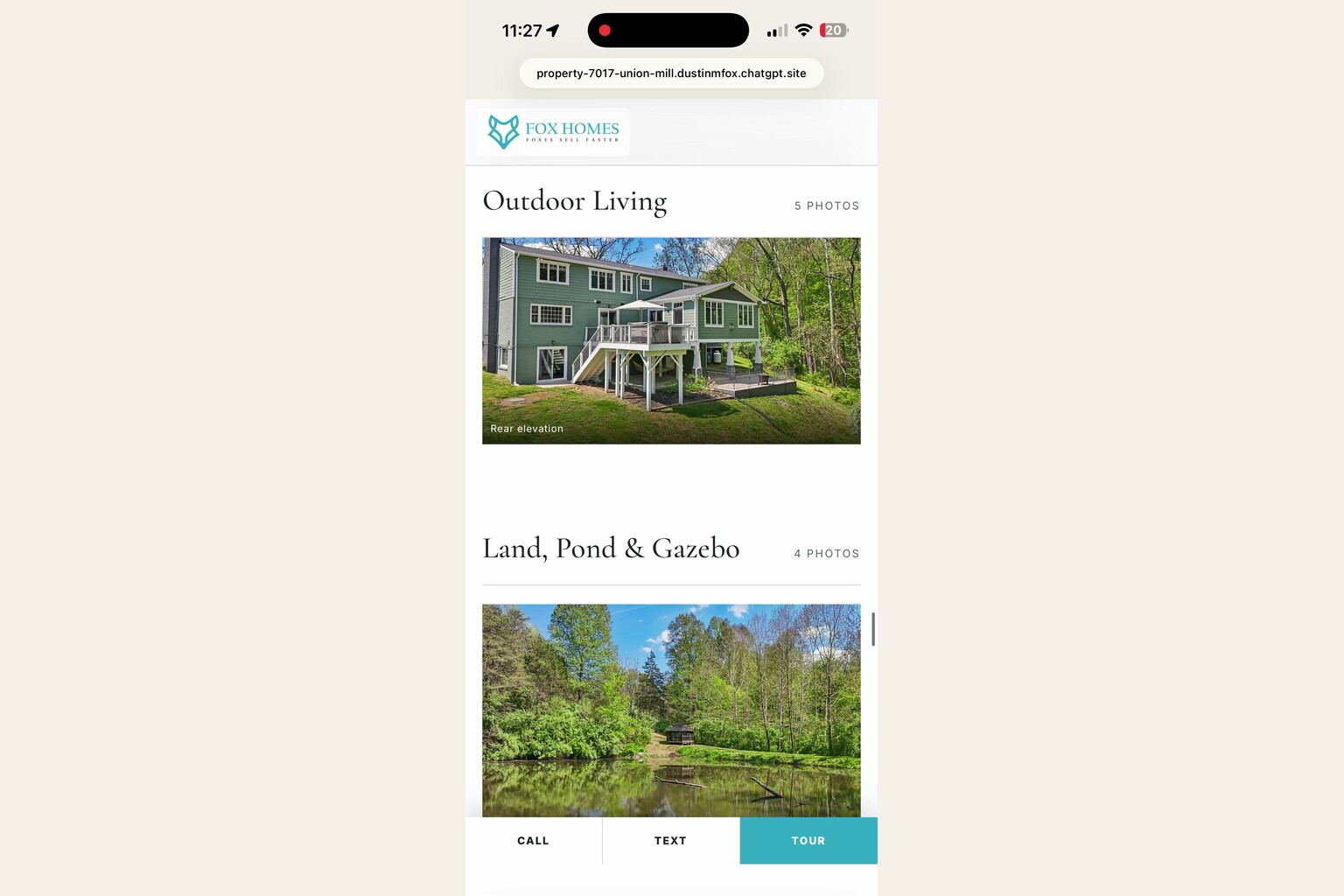
The finished sample showed a clear property overview, large photography, grouped gallery sections, and persistent mobile actions. It gave the listing a standalone narrative instead of placing it inside a portal full of competing properties. It also demonstrated that a site can be visually polished while remaining structurally simple: one page, responsive styling, optimized images, and focused navigation.
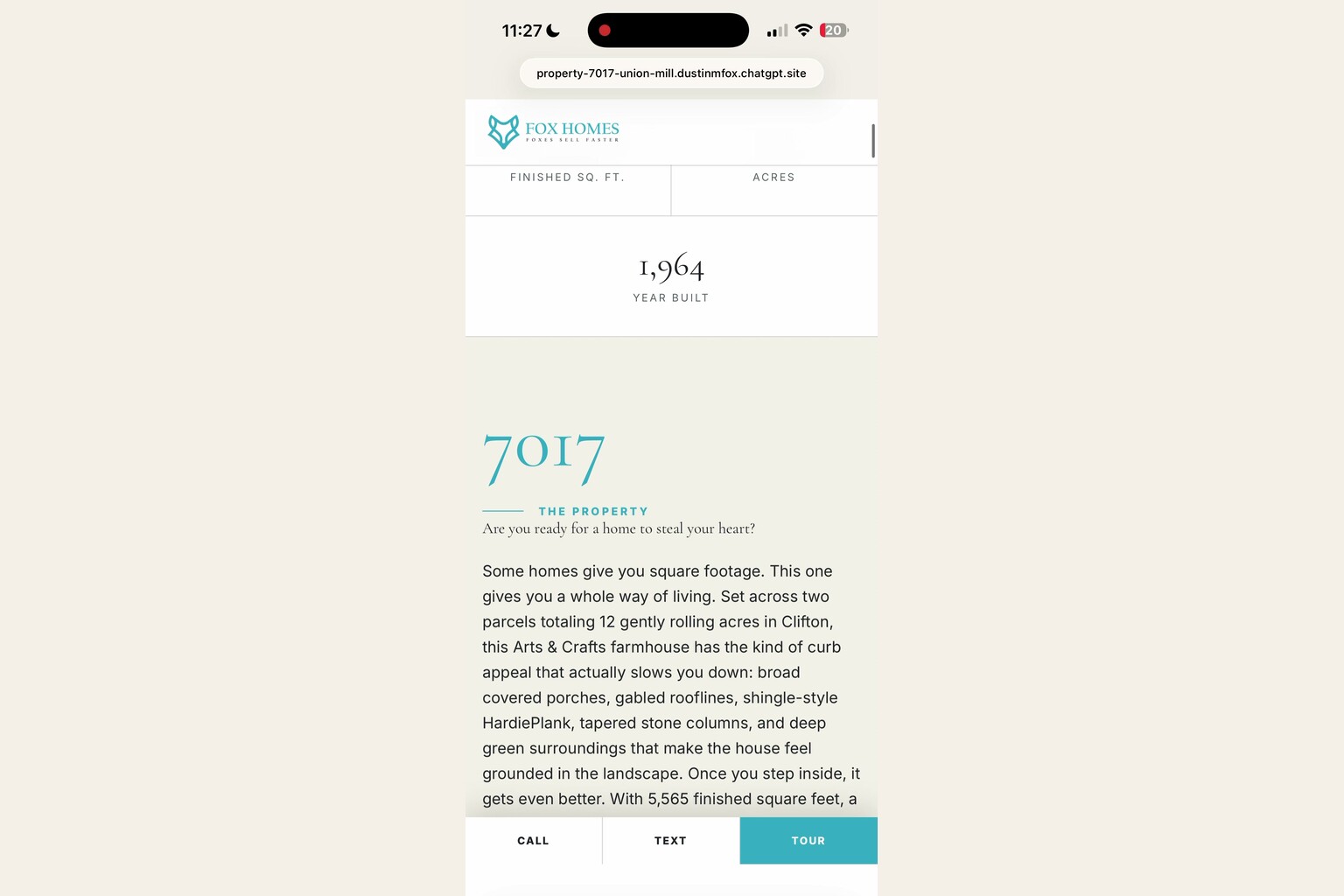
There are limits to what this proves. One successful property does not establish perfect room recognition across every architectural style or photo set. It does not prove that every fact visible in a screenshot is accurate. It does not replace the listing agreement, MLS data, disclosures, floor plans, a survey, or the agent's final review. The test proves the workflow is useful when its uncertainty stays visible.
For a related example of turning a demonstrated process into repeatable instructions, read the exact AI skill file that builds business automations. The same principle applies: the durable value is the operating procedure, including its checks and stop conditions.
How AI Reads Unlabeled Listing Photos
OpenAI's official ChatGPT Image Inputs FAQ says ChatGPT can understand and interpret static images added to a conversation. It also documents important limitations: image descriptions can be wrong, spatial tasks can be difficult, and resizing may affect the original dimensions. The current image-input feature handles static images, not video files.
The downloadable workflow accounts for those limitations by treating filenames as hints, not truth. It asks the operator to inspect every image and record the file, likely room, likely level, orientation, quality notes, and whether the image should be kept, cut, or marked unsure.
The classification process looks for several kinds of visual evidence:
- Exterior materials, rooflines, doors, landscaping, and camera direction.
- Repeated finishes, flooring, trim, fixtures, and furniture across adjacent rooms.
- Stair direction and window placement that can help connect levels.
- Bath finishes that may match a nearby bedroom sequence.
- Multiple angles of the same room that should be grouped instead of scattered.
- Image sharpness, exposure, orientation, and whether an angle adds useful information.
The workflow then proposes a buyer-style sequence: exterior arrival, main level, upper level, lower level, outdoor spaces, and special structures when they exist. It keeps stronger angles of important spaces and trims redundant frames. The sequence is a recommendation until the agent approves it.
This is where the system earns trust. When the evidence is strong, it can label and order confidently. When two rooms share finishes or a level is unclear, it cross-checks nearby images. When ambiguity remains, it marks the item unsure and asks. A wrong room caption published beautifully is still wrong.
Why the Human Approval Gate Matters
The skill creates a hard stop before site code is written. It first presents a photo plan, a proposed hero, a cut list with reasons, a design direction, a sampled color palette, and a page outline. The agent has to approve that plan before the build continues.
This prevents three common failures. First, the website cannot silently publish a guessed room name. Second, weak or duplicate photography does not become permanent merely because it was present in the source folder. Third, the design does not race ahead of the property's actual character.
The approval table should make uncertainty obvious. A line marked “unsure” is not a failure. It is the correct result when the visual evidence is insufficient. The person who knows the property can resolve the label, remove the frame, or provide more context.
The same gate applies to copy. If the agent supplies a listing description, the workflow can structure it. If the workflow drafts one, the agent must approve it before publication. Property marketing should describe objective features and location facts. It should not characterize the people who should live there, make demographic claims, rate neighborhood safety, or add unsupported school commentary.
That review pattern also appears in AgentAIBrief's automated listing-presentation workflow. AI can assemble the material quickly, but the professional still owns the client-facing facts.
What the Finished Property Site Includes
The skill builds a one-page property presentation with no required application framework or build step. Its goal is portability. The final folder can be placed on a normal static host, moved later, or connected to a custom domain after the address is approved.
The standard page can include:
- A full-bleed hero using the strongest horizontal exterior image, a slow zoom, the status, address, price, and approved actions.
- A compact fact band for approved details such as price, beds, baths, finished area, acreage, or year built.
- A short positioning section based only on confirmed features.
- A branded agent section with the supplied logo, headshot, contact details, and brokerage information.
- A feature list that highlights property attributes without generic icon clutter.
- A grouped photo gallery with room captions, keyboard and swipe controls, and neighboring-image preloading.
- Optional tour, floor-plan, map, or open-house sections when valid assets exist.
- A compliance footer and required brokerage or equal-housing elements.
- A mobile action bar that keeps approved contact choices visible without covering the page.
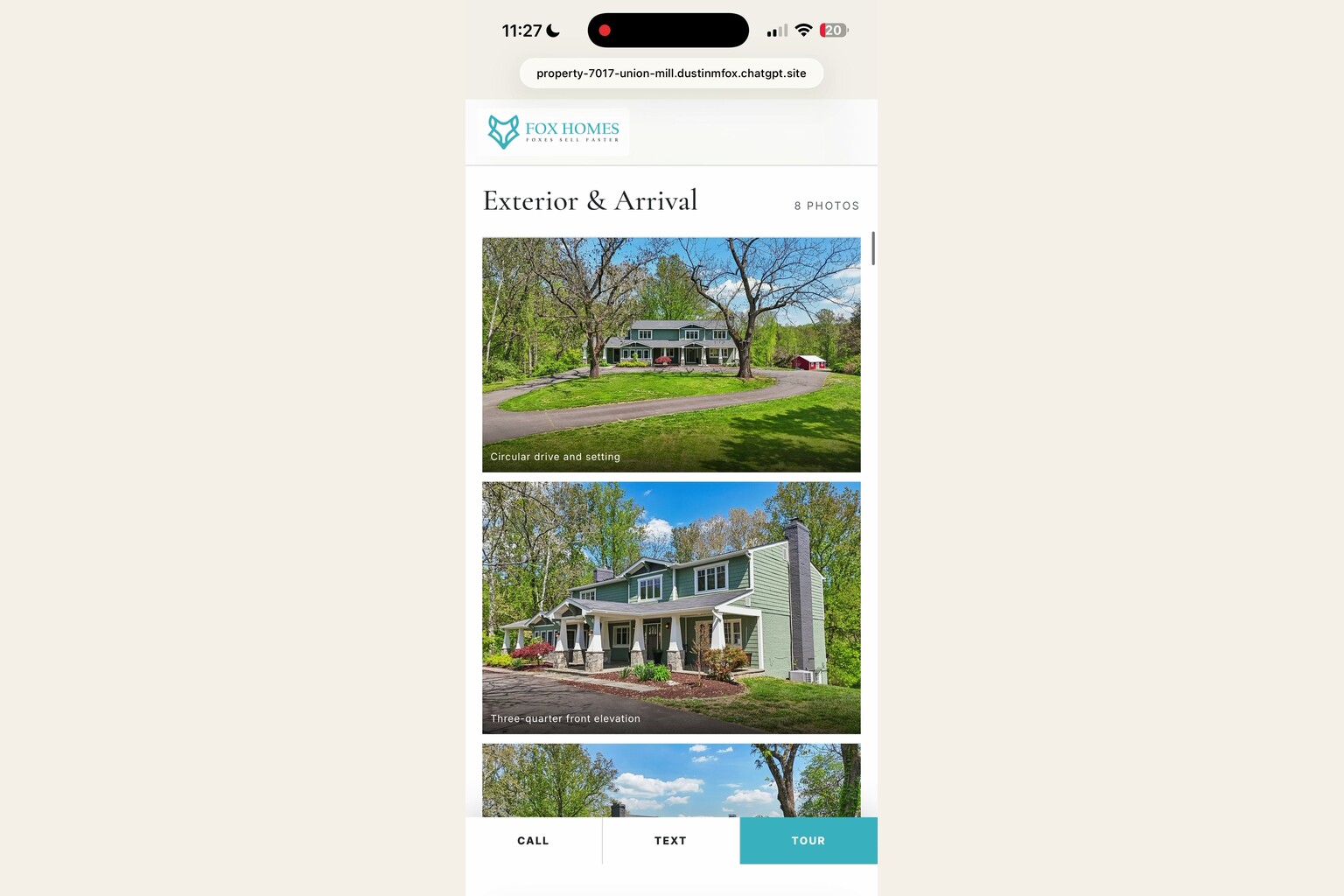
The workflow skips empty sections. If there is no floor plan, it does not render a broken floor-plan block. If no tour URL was supplied, it does not invent one. If a feature has not been verified, it stays out.
The visual system is also property-led. The skill recommends sampling an accent color from the photography, such as a door, material, landscape tone, or architectural detail. The chosen design direction can feel traditional, gallery-like, or dramatic, but the photography remains the main subject.
How the Photo Tour Gets Organized
Most listing galleries are technically functional but narratively flat. They place images in a grid and make the visitor do the sorting. The downloadable skill creates a “Tour Rail” by grouping images under level or area headings.
The sample result moves through the house rather than bouncing randomly between the exterior, a bath, the rear yard, and the kitchen. That ordering helps the viewer understand how the spaces relate. On desktop, a small rail can show the active level. On mobile, sticky area labels can keep the current section clear while the visitor scrolls.
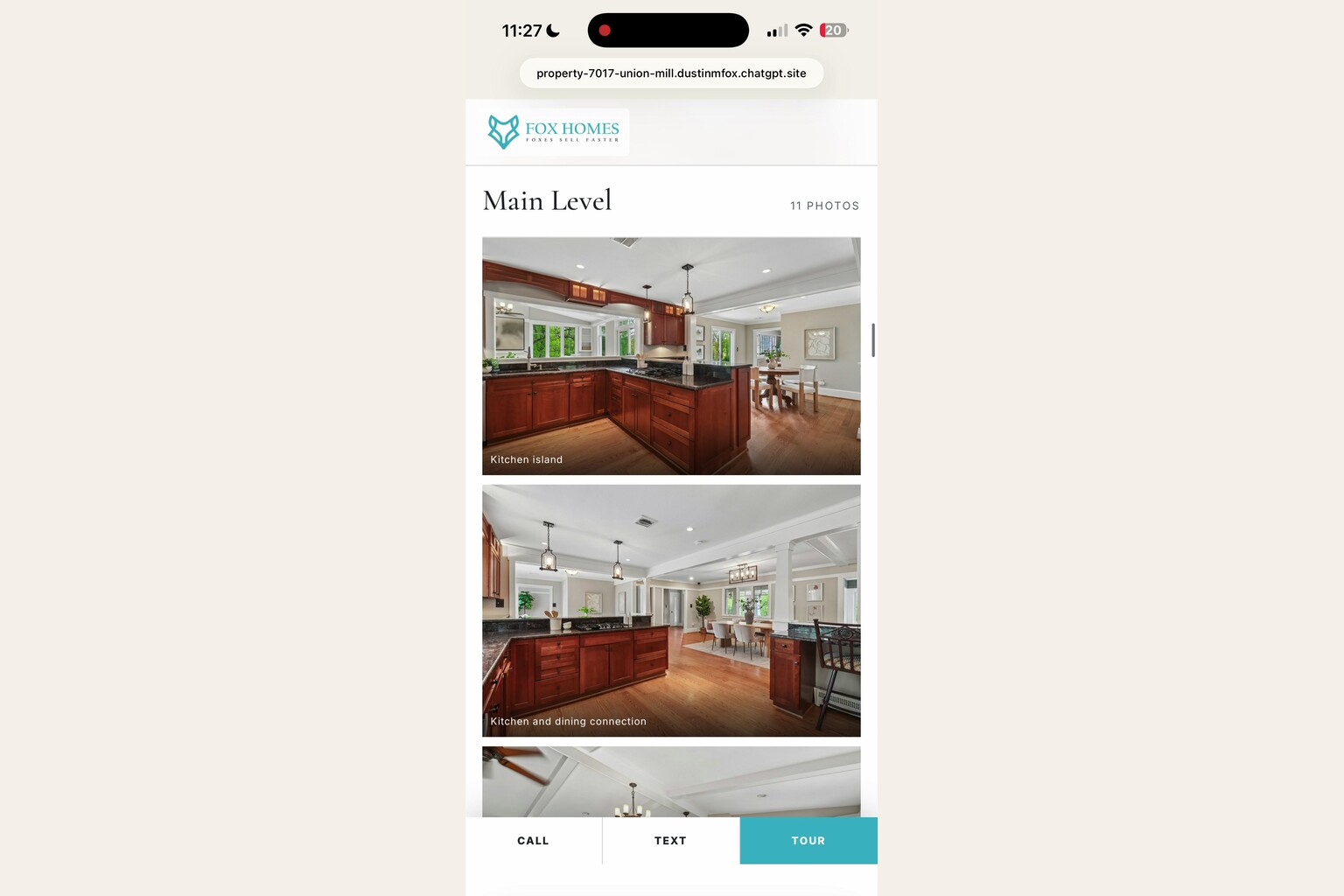
The workflow renames approved files in their final order. That creates a stable relationship between the gallery sequence, room captions, optimized versions, and lightbox positions. It also makes later edits easier. If the listing receives a better twilight exterior or a corrected room label, the operator can update the affected item instead of rebuilding the entire site from scratch.
Two image sets are produced. Full images are optimized for the enlarged gallery. Smaller thumbnails load in the page grid. Metadata, including embedded location data, should be stripped from public copies. Originals stay untouched in the source folder.
The hero receives extra treatment because it affects loading, sharing, and first impressions. It should be preloaded, sized explicitly, and used to create the social-share image. Below-the-fold photos should load lazily with dimensions defined so the page does not jump while the gallery appears.
Branded and Unbranded Versions
The skill produces a branded public page and, by default, an unbranded mirror for MLS use where local rules require it. The unbranded version retains the property presentation but removes agent identity, team and brokerage branding, direct contact actions, headshots, logos, and branded metadata.
The unbranded page is not just the same file with a logo hidden in CSS. The workflow requires a deliberate leak check across visible content, page metadata, structured data, image assets, contact links, and mobile actions. Nothing on the branded page has to link to the mirror. The mirror URL can be handed to the agent for use in the appropriate listing field after the local MLS rules are confirmed.
This separation solves a practical problem. The marketing site can make it easy to contact the listing representative, while the compliant mirror can present the same property photos and facts without agent promotion.
The architecture is intentionally simple. A branded page, an unbranded page, optimized photographs, a configuration file, a social image, and any optional backend functions live together in one portable site folder. Simple does not mean unreviewed. Every version still needs mobile, metadata, link, image, and compliance testing.
Using ChatGPT Without Inventing Product Claims
The source video includes interface directions and a model label that may reflect one account at one moment. Those details are not reliable instructions for every reader. This article therefore uses the current public OpenAI documentation instead of repeating an unsupported model name or saying the workflow only works in a desktop app.
OpenAI's Projects documentation says Projects can keep chats, uploaded files, and project instructions together. That makes a Project a practical place to store the skill, approved facts, visual references, and revisions. File limits and available tools vary by plan and workspace.
OpenAI's Canvas documentation says Canvas supports writing and coding work, direct edits, and React/HTML rendering in a sandbox. A Canvas preview is useful for review, but it is not the same as deploying a permanent public website. Network access and package behavior can also depend on workspace controls.
A product-safe instruction is therefore simple: use the current ChatGPT surface in your account that supports static image inputs and code work. Create a Project when persistent context helps. Use Canvas if it is available and useful for review. Treat public hosting, custom domains, analytics, and lead capture as separate deployment decisions.
For another production example with a dedicated mobile experience, see the open-house feedback website skill. It uses a different interaction, but the same discipline applies: approved inputs, public and private boundaries, persistent data testing, and human verification.
A Safe Build Process
The most dependable first run uses one listing whose facts and photographs you can verify easily.
- Prepare the source folder. Keep the original image set intact. Add the approved logo, headshot, listing facts, agent details, brokerage details, and any valid tour or floor-plan links.
- Start a dedicated workspace. Add the skill and source assets to a ChatGPT Project or another approved AI coding environment with visual-input support.
- Complete the interview. Supply the address, status, price, beds, baths, finished area, approved description, features, contact information, and branding. Do not let the system fill gaps with assumptions.
- Review the inventory. Confirm the number of images retrieved matches the expected count. A partial download is a blocker, not permission to continue quietly.
- Inspect the proposed photo plan. Check every room label, level, keep/cut decision, hero selection, and uncertainty note.
- Approve the design and outline. Confirm the sampled colors, page sections, branded content, and whether an unbranded mirror is required.
- Build locally. Optimize public copies, generate the page files, add metadata, and keep original photographs unchanged.
- Run pre-launch QA. Test mobile, tablet, desktop, every photo, every button, the lightbox, reduced motion, metadata, structured data, and the unbranded identity sweep.
- Preview before deployment. Share the local or temporary preview with the decision-maker and collect explicit approval.
- Deploy only after approval. Connect a final domain if desired, then update canonical links, sharing metadata, QR codes, and campaign destinations.
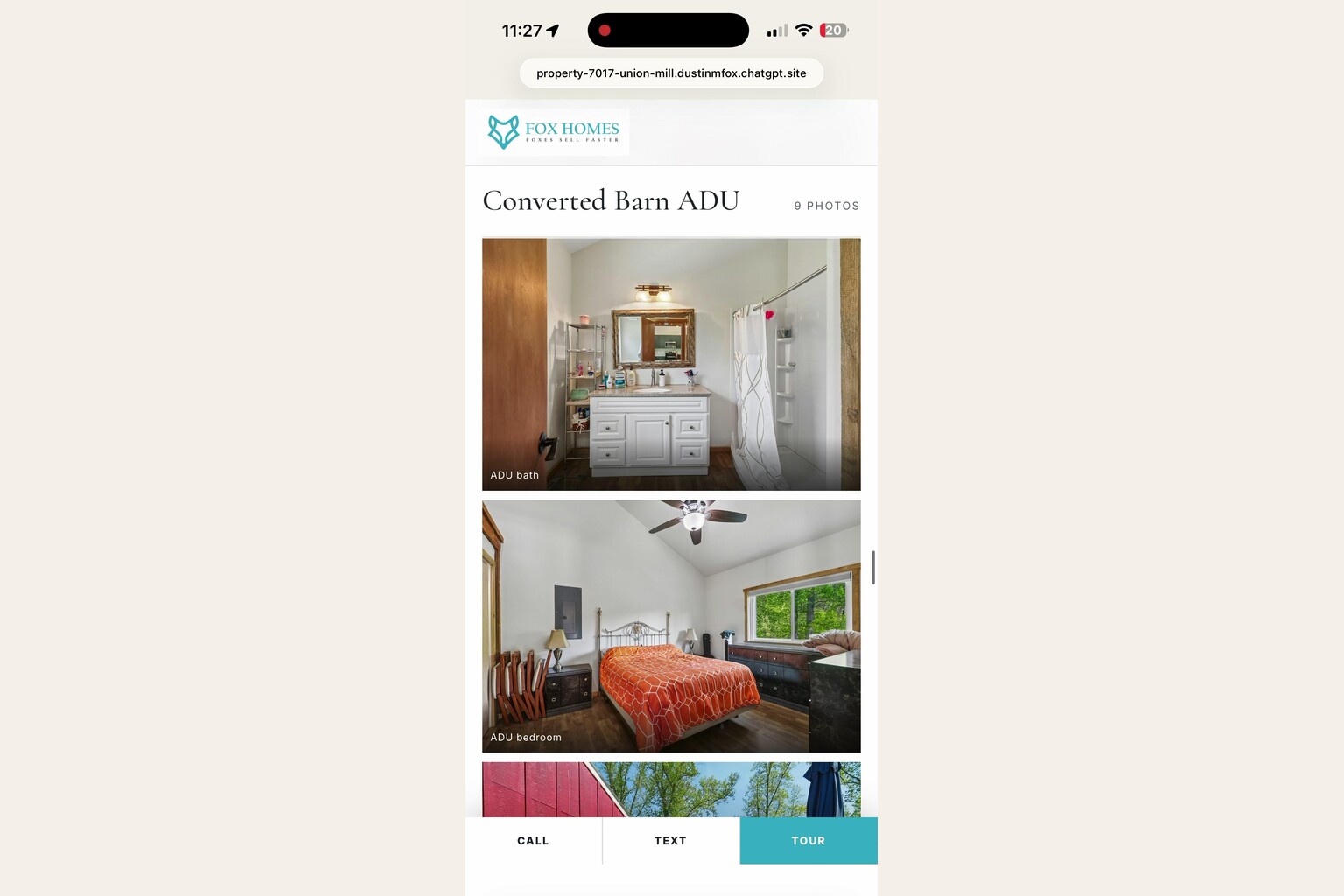
The skill also supports edit sessions. Once a configuration file exists, a price change, status update, new photo, or new open-house time should update only the affected parts. The operator still reruns the relevant QA checks and confirms that both branded and unbranded versions stay synchronized where appropriate.
Advertising and Registration Mode
The download includes an optional advertising mode. This is the highest-risk part of the workflow because it changes the page from presentation-only to data collection. It should remain off unless the campaign owner has approved the gate, fields, consent language, privacy policy, storage, access controls, and testing plan.
A soft gate can show the hero, facts, and an initial set of photos before asking a visitor to unlock the rest. A hard gate can require registration before showing the property content. An ad-only mode can apply the gate only to recognized campaign arrivals while leaving organic, sign, and listing traffic ungated.
The skill also describes a Google-first registration option with a normal form fallback and a small leads backend. That configuration requires real credentials, a real database or form destination, protected administrative access, and end-to-end verification. A visual mockup is not a working lead system.
The unbranded mirror must never receive the gate. The public compliance footer must remain reachable. A soft gate should not block the approved mobile contact bar. The site should store only the data the operator has a legitimate reason to collect, and access keys must never be hardcoded into public files.
Before sending paid traffic, test at least these paths: ordinary visit, campaign-tagged visit, successful registration, failed validation, stored lead record, repeat visit, mobile action, and unbranded mirror. Confirm that analytics and campaign parameters do not expose private data.
For a broader campaign system, the Instagram Reel ad-funnel skill explains audience building, registration links, and human checkpoints. Keep the property-site build and the paid-media decision separate until both are individually ready.
Quality Assurance Before Launch
A polished hero can hide a broken site. The skill's QA stage checks the full experience at mobile, tablet, and desktop widths. The bottom action bar must not cover the final content. The gallery must open the correct image and caption. Keyboard arrows and swipe behavior should move predictably. Lazy-loaded images must resolve, and the page should not overflow horizontally.
Motion needs a reduced-motion fallback. The slow hero zoom and scroll reveals should become static when the visitor prefers reduced motion. Counters should display their final values without depending on an animation completing. Important content should never exist only inside motion.
Metadata also needs inspection. The canonical URL, sharing title, sharing description, social image, and structured data should all use the final domain and approved property facts. When a custom domain replaces a temporary host, the operator should sweep every old URL out of the page, metadata, QR code, and campaign configuration.
Finally, inspect the result as a person, not just a test script. Does the first screen explain what is being offered? Does the photo order feel coherent? Are room captions accurate? Is every supplied fact visible in the right place? Are unsupported claims absent? Can a visitor reach the approved action without fighting the interface? Does the unbranded mirror contain any identity leak?
The best test is a listing you know well. Compare the generated photo order to the real floor sequence, correct the uncertain labels, and verify every action before using the workflow on a more complex property.
Frequently Asked Questions
Can ChatGPT build a single-property website from listing photos?
It can help analyze static images, organize a photo plan, write site code, and preview HTML or React when the relevant tools are available. The downloadable skill adds the interview, approval, optimization, branded and unbranded outputs, and QA steps. A human must still verify the photos, facts, copy, compliance, and deployment.
Does the AI automatically know every room and level?
No. Clear rooms may be classified confidently, but similar finishes, repeated spaces, unusual layouts, and missing context can produce uncertainty. The correct workflow cross-checks the photo sequence and marks unresolved items for human review instead of publishing a guess.
What is included in the free ZIP?
The ZIP contains the full single-property-site operating procedure: intake questions, photo retrieval, visual classification, approval gates, image optimization, page structure, design directions, branded and unbranded requirements, optional advertising mode, metadata, QA, deployment, edit sessions, and configuration schemas.
Does the website require a framework?
No. The skill is designed to produce a portable one-page site without a required framework or build step. Optional lead-capture backends may require a compatible host and additional configuration.
Can the same page be used as the unbranded MLS link?
The workflow generates a separate unbranded mirror. That version removes agent and brokerage identity, contact actions, branding, and related metadata while preserving approved property content. Local MLS rules still need to be confirmed before use.
Can the site collect leads from advertising?
Yes, the skill includes optional soft, hard, and ad-only registration patterns. Do not enable them until the consent language, privacy policy, fields, database, administrator access, campaign parameters, and full registration flow have been reviewed and tested.
The Bottom Line
The breakthrough is not that AI can produce a webpage. The breakthrough is that a reusable skill can inspect a real photo set, expose uncertainty, ask for approval, preserve a coherent tour order, build separate branded and unbranded outputs, and verify the result before anyone publishes it.
Download the skill near the top of this guide. Run it first on a listing you know. Treat every proposed room label and property fact as a draft until reviewed. Keep advertising mode off until its data flow is fully configured. Then use the workflow as a repeatable production system instead of starting every property site from a blank chat.
Follow AgentAIBrief on Instagram for practical AI workflows, and subscribe to AgentAIBrief for new skills, field tests, and verification playbooks.