The Exact AI Skill File That Builds Business Automations
Quick Summary
- This downloadable SKILL.md gives an AI agent a disciplined way to inspect a business process, identify repeated work, and recommend a small automation worth building
- The process separates symptoms from root causes by tracing each opportunity three levels deep before proposing a solution
- Every candidate is scored for leverage, feasibility, safety, and durability, so the most exciting idea does not automatically win
- Discovery begins read-only, external changes require approval, the first build targets existing tools and a zero-dollar software budget, and every workflow includes a kill switch
- Current OpenAI documentation says Work mode and Codex support subagent workflows for eligible accounts, but access, models, and intelligence settings can vary
Most businesses do not need another random AI prompt. They need a repeatable way to find the work that should be automated, understand why that work keeps appearing, and build the smallest reliable workflow that removes it. That is what the Automation Scout skill is designed to do. It turns a vague request such as “find ways to use AI in my company” into a structured operating process with evidence, scoring, safety gates, and a working first version.
The downloadable file in this article is the exact SKILL.md used for the workflow. It is not a simplified checklist or a marketing summary. It gives an AI agent instructions for discovery, analysis, prioritization, implementation, and verification. You can read it, adapt it to your own environment, and keep the original file as a reference.
The central idea is simple: do not start with the tool. Start with the repeated work. Look for recurring handoffs, duplicated data entry, status checks, document assembly, follow-up preparation, research routines, and reporting chores. Then trace the cause, estimate the real cost, compare options, and build one narrow workflow that can be tested safely.
That method is more useful than asking an AI model to brainstorm fifty automation ideas. A long idea list feels productive, but it rarely tells you which task matters, which systems are involved, what permissions are required, or how success will be verified. A durable skill makes those questions part of the process.
Download the Exact Automation Scout Skill
The original file is available below. The download remains a Markdown skill file so you can inspect every instruction before using it.
File integrity check: SHA-256 133b9c9c60e11a036fd10ae7ceb1bc0f685f4eff291ae244c11c5f6e7d18cdfd.
Before installing or adapting any workflow file, read it completely. Confirm that its permissions, data sources, write actions, and stop conditions match your organization. A skill should make an agent more predictable, not give it undefined authority.
What an AI Skill File Actually Does
A skill is a reusable operating procedure for an AI agent. It can define the job, approved tools, required inputs, decision rules, output format, safety boundaries, and verification steps. The prompt for a single task may disappear after the conversation ends. A skill can remain available as a durable process that the agent follows again.
OpenAI's current skills documentation describes skills as an authoring format for reusable workflows. Skills can be used in the ChatGPT desktop app, Codex CLI, and the IDE extension. That makes the format useful for processes that need more structure than a one-time chat response.
The Automation Scout skill focuses on one business problem: choosing the right automation to build. It does not assume the company needs a complex agent, a custom application, or a new subscription. It begins by mapping what people already do and identifying where effort is repeatedly lost.
The file guides the agent through five connected phases:
- Discover the repeated work using approved, available evidence.
- Trace each opportunity through three levels of causation.
- Estimate the time, cost, risk, and impact of the current process.
- Compare candidates with a consistent scorecard.
- Build and verify the smallest complete workflow for the winner.
Those phases prevent a common failure: automating the first visible inconvenience without understanding the larger process. A manual copy-and-paste step may be annoying, but the real problem could be inconsistent inputs, missing ownership, or an unreliable source. Automating the copy step alone can make the underlying problem harder to see.
Start With Repeated Work, Not AI Features
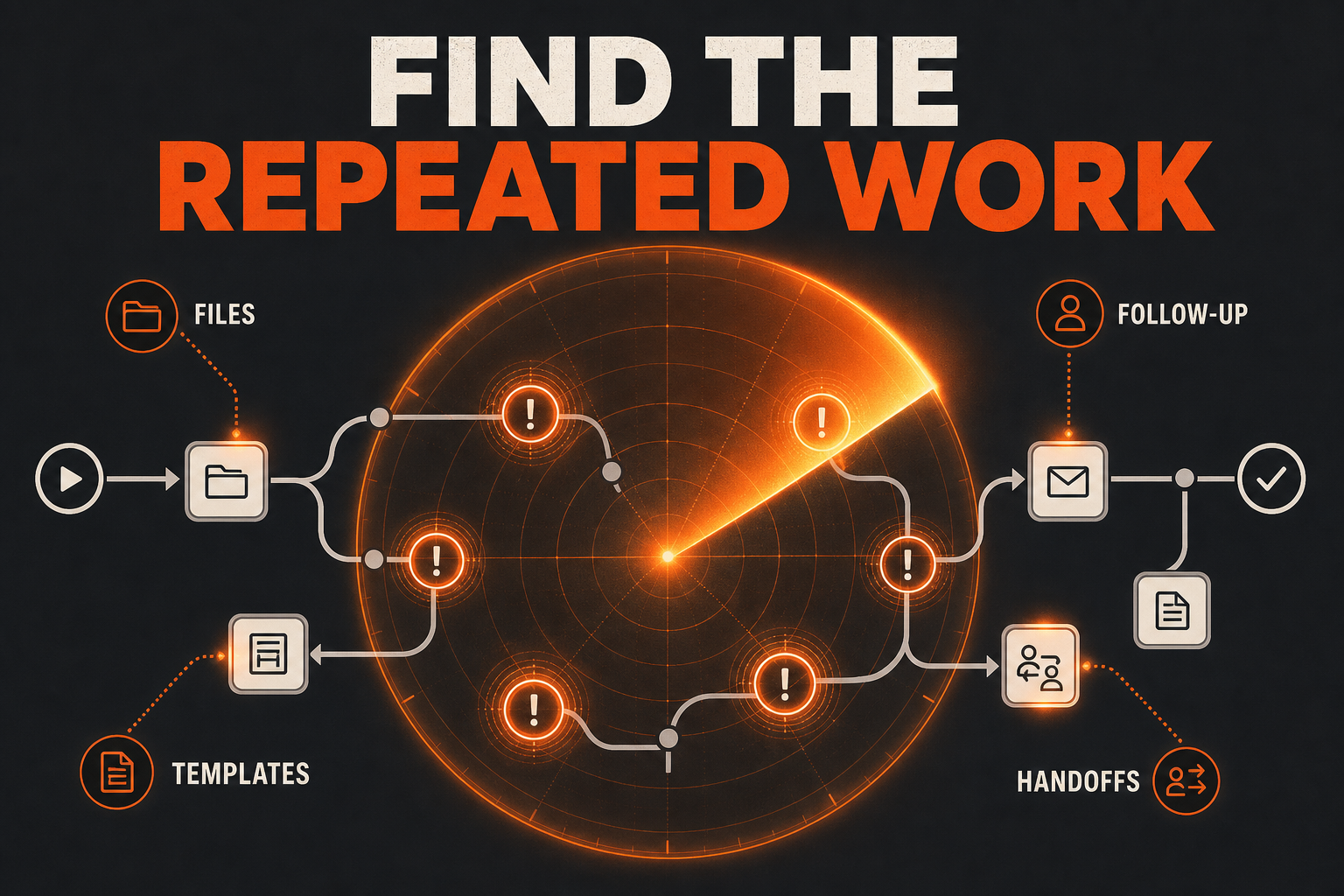
Good automation candidates usually announce themselves through repetition. The same report is rebuilt every Friday. The same property facts are moved between three templates. The same inbox questions require the same research. A manager asks for the same status update because no shared view exists. A meeting creates notes, but the follow-up tasks must be copied manually into another system.
The skill instructs the agent to look for patterns such as repeated data entry, recurring document creation, predictable research, routine reconciliation, status chasing, duplicated file handling, and handoffs that regularly stall. Evidence can come from files, process notes, calendars, task systems, templates, authorized application views, or interviews supplied by the user. The agent should only use sources that are connected and permitted.
This is an important boundary. An AI system does not automatically have access to email, calendars, company drives, customer records, or paid applications. Access depends on the tools and permissions configured for the current workspace. The skill treats missing access as a constraint to report, not an excuse to invent evidence.
The first pass is read-only. The goal is to observe and document, not reorganize files, change records, send messages, or create new external systems. Read-only discovery lets the business evaluate the recommendation before accepting operational changes.
A useful discovery note is specific. “The team spends too much time on administration” is not evidence. “Three people rebuild the same weekly pipeline update from four exports, taking a combined 3.5 hours and producing mismatched totals twice last month” is evidence. It names the people involved, frequency, sources, effort, and failure pattern.
Trace the Problem Three Levels Deep
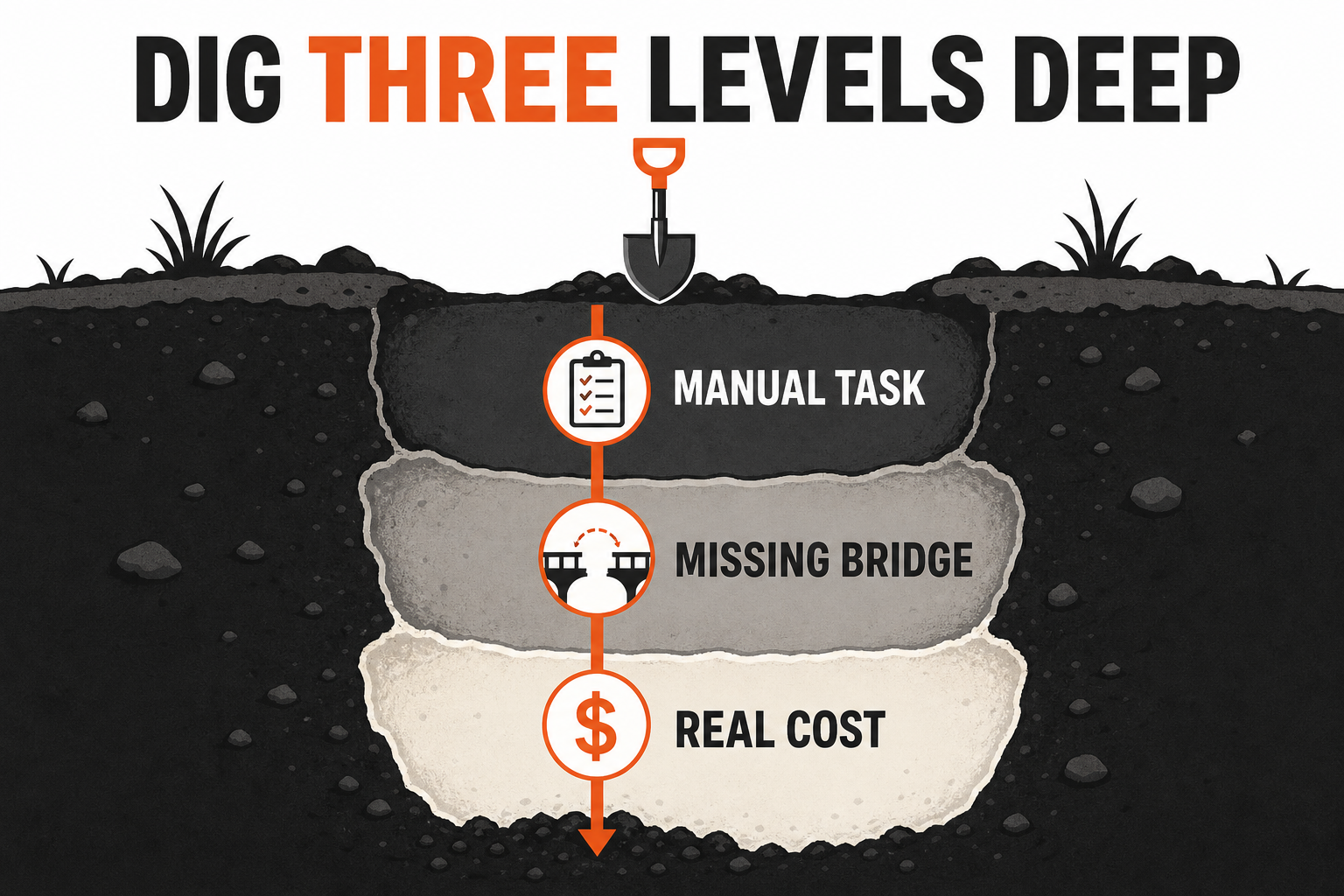
The most distinctive part of the skill is its three-level analysis. Instead of stopping at the visible task, the agent asks what causes it and what keeps that cause in place.
Level one is the manual task. What action is being repeated? Examples include transferring rows, renaming files, generating a standard briefing, checking whether information changed, or assembling a client-ready draft.
Level two is the missing bridge. Why must a person perform that action? Perhaps two systems do not exchange data. Perhaps a form does not require a necessary field. Perhaps the source has no consistent export. Perhaps the next person does not know when a task is ready.
Level three is the business cost. What does the missing bridge create? The cost may be staff time, delayed follow-up, inconsistent documents, reporting errors, missed deadlines, or slow decision-making. The goal is to connect the proposed automation to a measurable operational result.
This analysis changes the proposed solution. Imagine a team manually copies new form submissions into a tracking sheet. At level one, the obvious answer is a transfer automation. At level two, discovery may reveal that the form and sheet use different field names. At level three, the business cost may come from incomplete submissions that force a second conversation. The best first build may be validation plus a structured intake record, not a faster copy operation.
The method also helps reject weak ideas. A task that happens once per quarter and takes twenty minutes may not justify automation. A daily task that touches sensitive customer information may require controls that make a first version impractical. A recurring report built from an unstable source may need source cleanup before any workflow can be trusted.
Measure Time, Money, and Failure Cost
An automation recommendation needs a baseline. Without one, there is no way to know whether the workflow improved the business or merely moved effort into a new tool.
The skill asks the agent to estimate frequency, minutes per occurrence, people involved, hourly cost where the business can supply it, error rate, delay cost, and the effort required to maintain the proposed solution. Estimates should be labeled as estimates. When the data is incomplete, the agent should provide a range and state the assumptions.
A simple annual time estimate can be calculated as:
occurrences per year × minutes per occurrence × people involved
Divide by sixty to convert the result into hours. Multiply by an approved loaded hourly cost if the company wants a financial estimate. Then compare that value with implementation effort, review time, ongoing maintenance, and expected exceptions.
Do not treat every saved minute as cash returned to the bank. The practical value may be capacity, faster response, fewer mistakes, more consistent output, or less context switching. The scorecard should describe the kind of value being created rather than forcing every outcome into an inflated savings claim.
A good baseline also names failure conditions. How often does the current process produce missing fields? How many handoffs are late? How frequently does someone rebuild the output? How long does quality review take? Those measurements become acceptance tests for the new workflow.
Compare Three Candidates Before Choosing
The skill does not recommend the first plausible idea. It develops multiple candidates and compares them across the same four dimensions: leverage, feasibility, safety, and durability.
Leverage asks whether the workflow removes meaningful repeated effort or prevents an important failure. Feasibility asks whether the necessary sources, permissions, file formats, and tools are actually available. Safety asks whether the work can be bounded, reviewed, and stopped without harmful external effects. Durability asks whether the workflow will survive ordinary changes without constant repair.
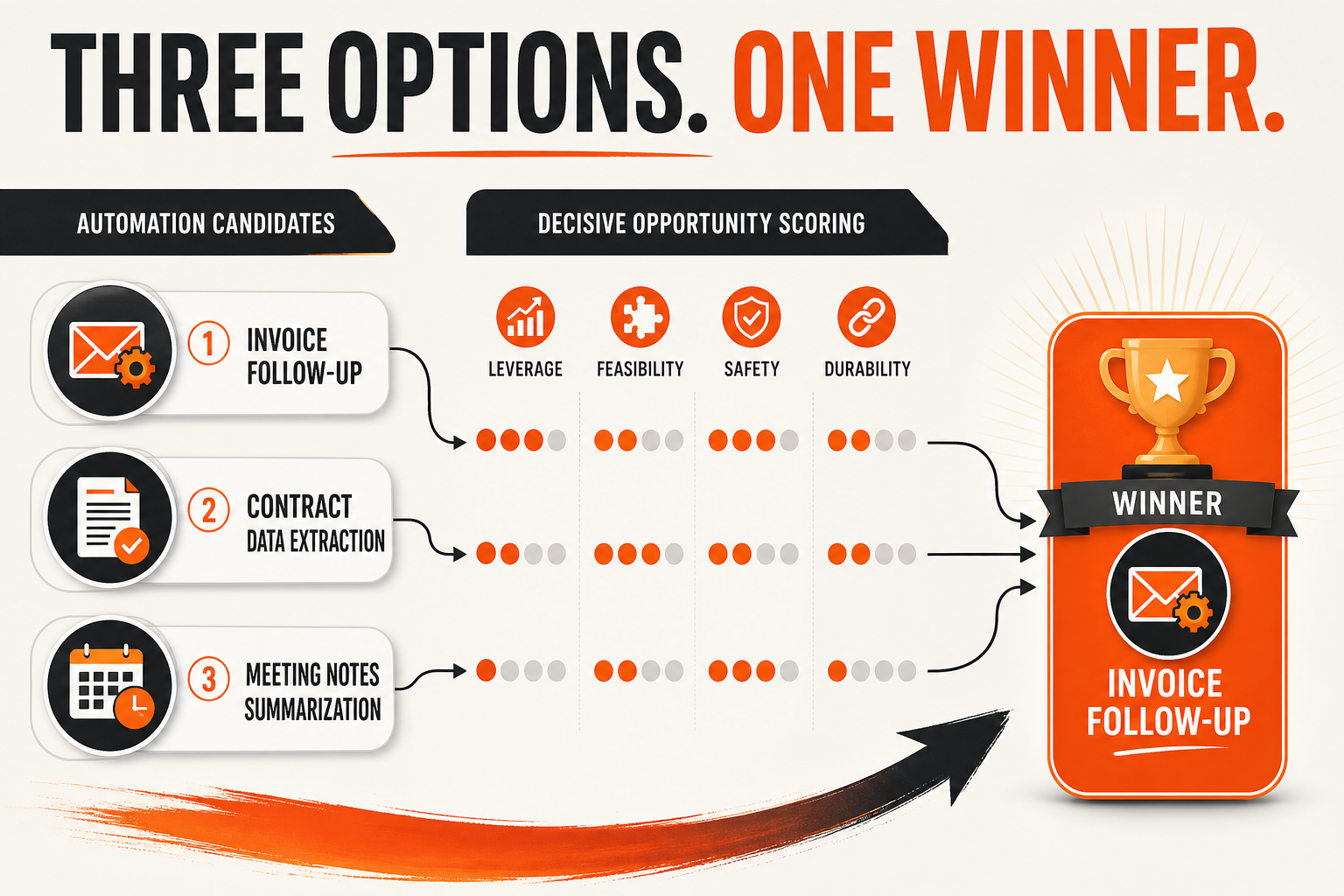
This scorecard gives modest ideas a fair chance. A glamorous customer-facing agent may have high perceived leverage but low safety and low feasibility. A document-preparation workflow may have slightly lower leverage, yet win because its inputs are controlled, the output is easy to inspect, and the current team already owns the required tools.
The recommendation should explain the tradeoff in plain language. For example: “Candidate A saves the most time, but it requires write access to the customer system and cannot be verified easily. Candidate B saves less time, but uses exported files, produces a reviewable draft, and can be tested with no external change. Build Candidate B first.”
That explanation is more valuable than a mysterious numerical score. Scores create consistency. The written rationale creates accountability.
Build the Smallest Complete Workflow
Once a candidate wins, the next step is not to automate the entire department. The skill calls for the smallest complete workflow. “Smallest” means limited scope. “Complete” means it still has all the parts required to operate safely.
The first version should include a defined input, validation, a transformation or decision step, an output, a ledger or log, a dry-run mode when practical, error handling, a human review point, and a stop mechanism. A script that works only when every input is perfect is a demo, not a complete workflow.
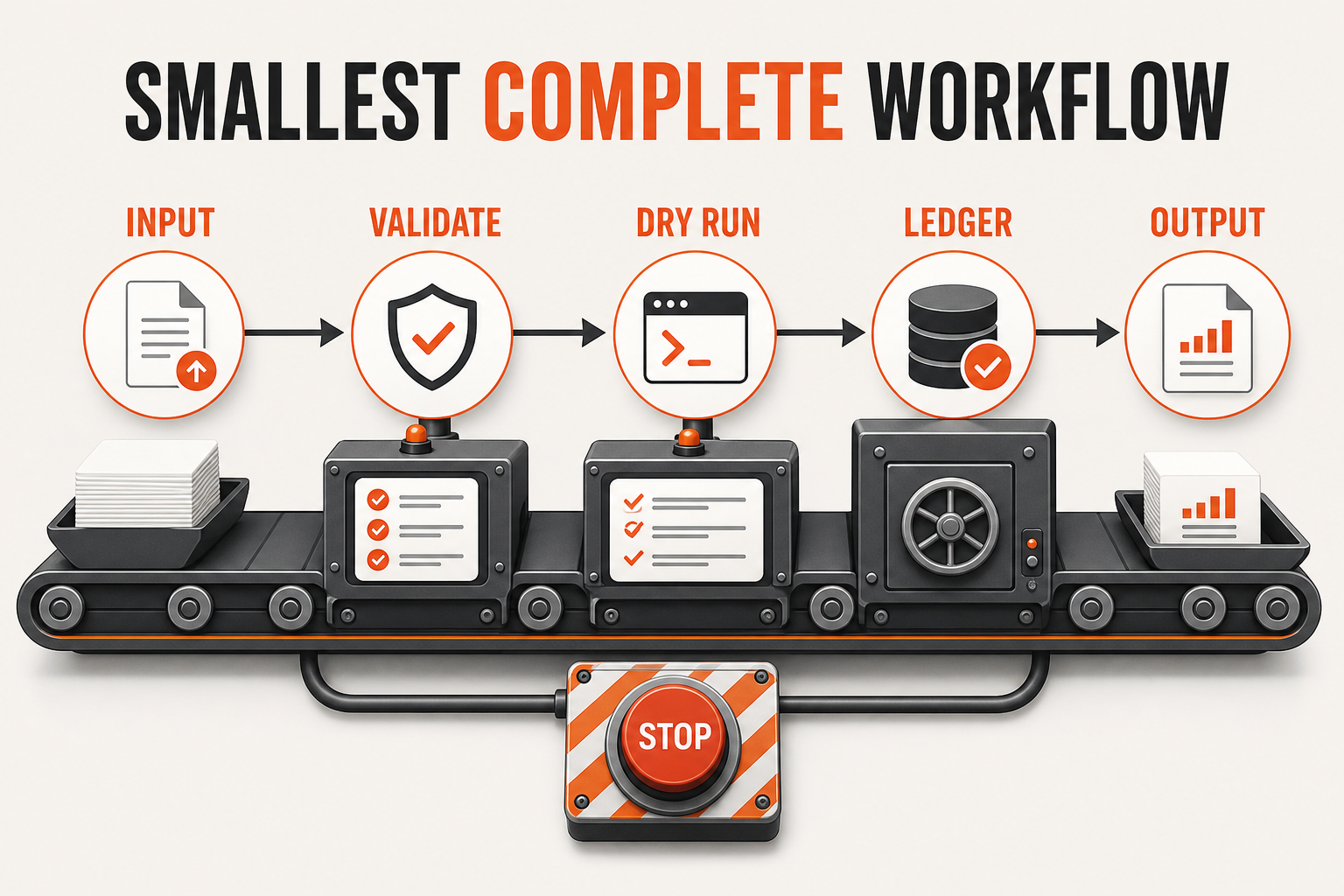
Suppose the winning opportunity is a weekly operations brief. The smallest complete version might read two approved exports, validate required columns, calculate a small set of metrics, generate a draft in a designated folder, record the source timestamps, and stop for review. It should not also email the brief, update the CRM, post to Slack, and change the reporting dashboard in version one.
Keeping the first build narrow improves learning. The team can compare the generated draft with the manual standard. If the metrics differ, the source and calculation can be inspected. If the format is wrong, only the output step needs revision. Once the core workflow is dependable, downstream actions can be considered separately.
The skill prefers existing tools and a zero-dollar software budget for the first pass. This is not a claim that every automation can be built for free. It is a forcing function that asks whether the business can prove the value before adding another subscription. If a paid tool is genuinely required, the recommendation should state why and request approval.
Safety Is Part of the Architecture
The downloadable file treats safety as part of the design, not a paragraph added after implementation. Discovery is read-only. Any external mutation requires approval. Sensitive data is minimized. Credentials are never requested in the report. The workflow includes a kill switch and a clear description of how to disable it.
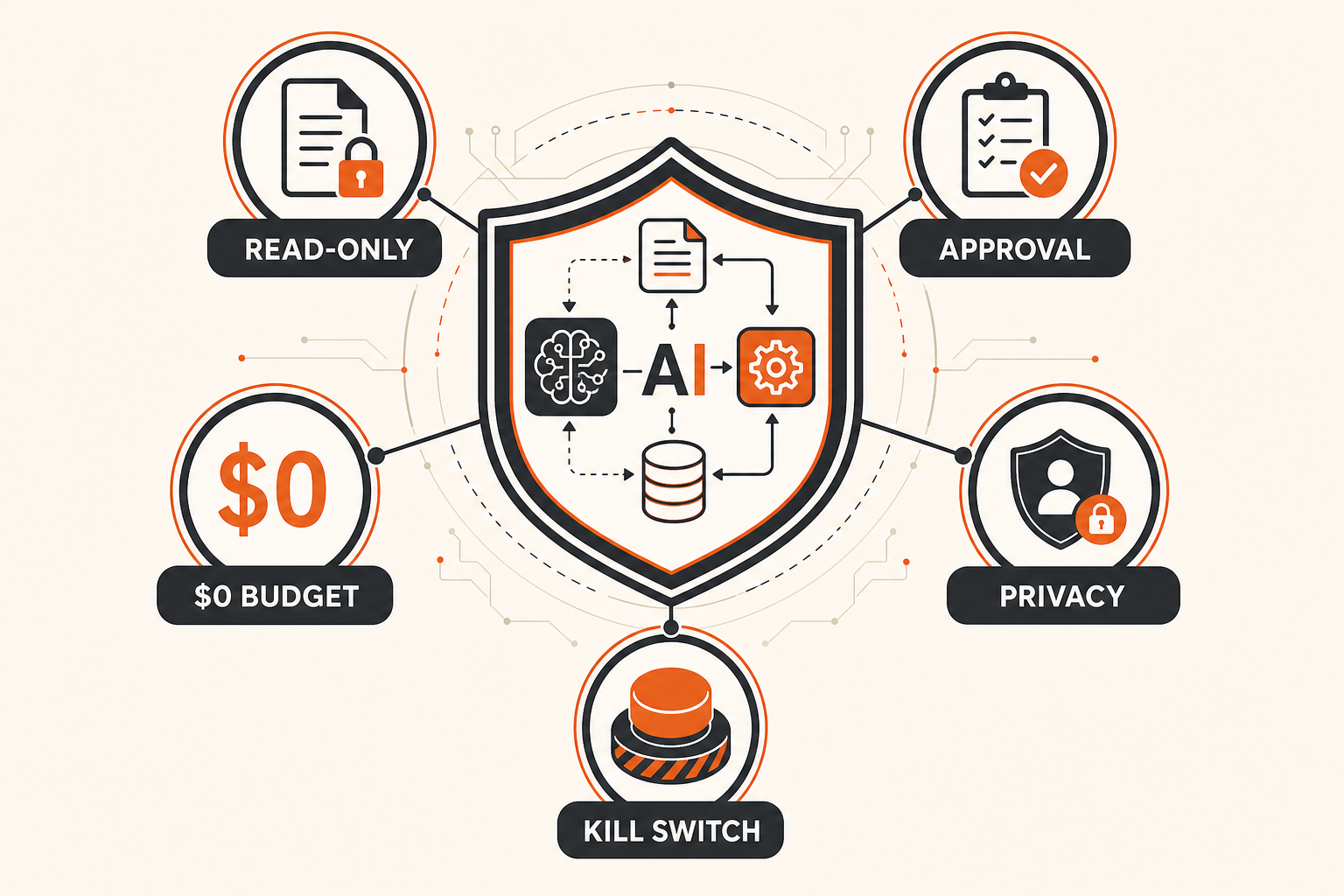
These controls matter because a useful automation often sits near important systems. It may read customer records, assemble financial data, prepare communications, or organize files. A mistake can be amplified quickly if the workflow is allowed to send, publish, delete, or overwrite without review.
The safest first version generally produces an internal draft or recommendation. A person reviews the evidence and decides whether the next action should happen. If the company later automates a write step, that step should have its own permission boundary, audit trail, exception handling, and rollback plan.
The kill switch should be practical. It might be a disabled scheduled job, a configuration flag, a revoked token, a stopped service, or a documented command. “Ask the AI to stop” is not enough. The business needs a control that works even when the workflow is malfunctioning.
Using Work Mode and Codex Subagents
Current OpenAI documentation says Work mode and Codex can run subagent workflows by assigning independent work to specialized agents and collecting their results. This can be useful during business discovery because research, process mapping, candidate scoring, and technical feasibility checks can sometimes run in parallel.
Eligibility and behavior vary. Work mode exposes subagent activity to eligible accounts. At most intelligence levels, OpenAI says users should request delegation explicitly. With Ultra on eligible accounts and supported models, ChatGPT can proactively delegate when parallel work would materially improve speed or quality. Subagents also consume more tokens than a comparable single-agent task, so parallelism should be reserved for genuinely independent work.
For this skill, a sensible division might use one lane to map repeated tasks from approved documents, another to analyze tool feasibility, and a third to review security and approval requirements. The main agent should keep the requirements, evidence, and final decision in one place. Parallel research should return concise findings rather than a pile of raw logs.
Do not run multiple agents that edit the same workflow files at the same time. Parallel reading and analysis are usually safer than overlapping writes. One implementer should own the first working version, and one bounded review pass should check the result against the acceptance tests.
How to Use the File Responsibly
Download the file and read it before installation. If your environment supports reusable skills, place it in the appropriate skill directory or project structure. If it does not, use the file as a documented operating procedure and give its instructions to your AI system with the relevant business context.
Then define the scope. Name the department, process, time window, approved sources, excluded systems, and people who can approve changes. A focused request might be: “Inspect the weekly marketing reporting process using these three templates and two exported reports. Work read-only. Identify three automation candidates, calculate a conservative time baseline, and recommend one zero-dollar first build. Do not change files or send messages.”
Provide representative evidence rather than unrestricted access. Five recent examples, the standard template, and the written process may be enough to see the pattern. Remove secrets and private information that are not necessary for the analysis.
Review the discovery report before implementation. Confirm that the described task actually occurs, the time estimate is plausible, and the proposed inputs are stable. Reject any recommendation that depends on access you cannot authorize or data you cannot verify.
Finally, test with a safe sample. Run the workflow in dry-run mode. Compare the output with the manual version. Exercise missing data, duplicate inputs, authentication failure, and unexpected file formats. Record what happened and refine the instructions once. A workflow that passes only the happy path is not ready for routine use.
A Practical Seven-Day Pilot
Day one: choose one repeated process and collect five representative examples. Do not choose the most politically important or technically complex process in the company.
Day two: run read-only discovery. Confirm the people, systems, files, frequency, and current failure pattern.
Day three: review the three-level analysis and baseline. Correct assumptions before the agent compares solutions.
Day four: score three candidates. Select the option with the best balance of leverage, feasibility, safety, and durability.
Day five: build the smallest complete workflow with validation, logging, dry run, review, and a kill switch.
Day six: test normal inputs and failure cases. Compare output quality with the manual standard.
Day seven: decide whether to adopt, revise, or stop. Document the measured result and the person responsible for maintenance.
The pilot ends with a decision, not an automatic rollout. A failed pilot can still be useful if it shows that the source data needs cleanup, the process lacks ownership, or the expected savings were overstated.
Common Ways Automation Projects Go Wrong
The first failure is solution-first thinking. The team buys a tool and searches for a problem that justifies it. The skill reverses that sequence by requiring evidence and a baseline.
The second failure is automating an exception-heavy process. If every case requires a different judgment, a rigid workflow may create more review work than it removes. Start with predictable inputs and a stable output.
The third failure is missing ownership. Someone must own the source fields, the workflow instructions, the review queue, and the response to errors. “The AI owns it” is not an operating model.
The fourth failure is hidden external action. A workflow that quietly sends, publishes, or updates records can create reputational and compliance risk. Keep the first version internal and require explicit approval for impact outside the workspace.
The fifth failure is no measurement after launch. Compare actual run time, exceptions, error rate, review effort, and output quality with the original baseline. If the workflow is not improving those measures, revise it or turn it off.
The Real Value of the Skill
The value is not that an AI agent can generate automation ideas. Almost any capable model can do that. The value is the discipline encoded around the idea: evidence before recommendation, causes before solutions, scoring before selection, a complete first build, and safety before external impact.
That discipline makes the file useful across different businesses. The specific workflow may involve reports, documents, research, data preparation, content operations, or internal handoffs. The evaluation method stays consistent.
Use the skill to make one decision better. Find one repeated task. Prove its cost. Build one narrow workflow. Verify it against the manual standard. Keep a person responsible for the outcome. Then decide whether the method deserves a second use.
If you want more practical AI systems for agents and operators, explore the three AI loops we actually use, nine AI operating cycles for a real estate business, and how GPT-5.6 can operate a scoped real estate workflow.
Frequently Asked Questions
What is included in the download?
The download is the complete SKILL.md operating file for Automation Scout. It contains the discovery process, three-level analysis, scoring method, implementation requirements, safety rules, and expected deliverables.
Does the skill automatically access my business systems?
No. It can use only the tools, files, and applications available and authorized in the active environment. Missing access should be reported. Do not provide unrestricted credentials or unnecessary private data.
Will the skill spend money on new software?
The first pass targets a zero-dollar software budget and existing tools. If a paid service is necessary, the agent should explain the need and request approval before any purchase or subscription.
Can the workflow send messages or change records?
Not during read-only discovery. External changes require explicit approval and should be added only after the internal workflow is verified. Keep permissions narrow and maintain an audit trail.
Do I need Ultra to use this skill?
No. The method can run in one capable agent. Ultra may support proactive subagent delegation for eligible accounts and supported models, but most users can explicitly request parallel agents when the task genuinely benefits from independent work.
How do I know whether the automation worked?
Compare it with the baseline. Measure run time, manual touches, exceptions, error rate, review time, and output quality. A workflow is successful only when it improves the operating result without creating unacceptable risk or maintenance.