AI Seller Presentation Website: Win Trust Early

Quick Summary
- A seller presentation website can begin earning trust before the agent reaches the front door
- The downloadable skill runs a six-step setup interview once, stores a reusable local brand profile, and asks only for property-specific inputs on later runs
- The output is a mobile-first guided website rather than a static PDF, with verified proof, a clear marketing process, optional media, and a responsive estimated-proceeds experience
- Every statistic, testimonial, credential, comparison, and marketing claim belongs in a source ledger before it appears on the page
- Compensation fields remain editable and clearly described as negotiable, while every financial result is labeled as an estimate
- The exact source ZIP used for this walkthrough is available below as a permanent Agent Edition download
An AI seller presentation website changes the timing of the appointment. Instead of making a first impression only after the door opens, the agent can send a polished, personalized experience in advance. The seller can see how the property will be positioned, what the launch process looks like, which proof supports the agent's claims, and how estimated proceeds respond to different assumptions.
That does not mean a website wins the engagement automatically. It means the seller receives evidence before the conversation. The live meeting can then focus on judgment, priorities, tradeoffs, and questions instead of asking the seller to absorb thirty generic slides for the first time.
The workflow behind this article is designed for reuse. It begins with one short profile interview, saves the agent's approved identity and proof locally, and uses a smaller property intake for each new presentation. The result is a custom guided site, not a rebranded template filled with unsupported numbers. Download the exact skill package below, inspect its rules, and adapt it to your own approved materials.
Why Sellers Start Deciding Before the Doorbell
A professional services decision rarely begins at the scheduled start time. It begins when the prospect receives the confirmation, opens the agent's materials, searches the agent's name, or compares the experience with another option. Every touchpoint answers an unspoken question: will this person be prepared, specific, and trustworthy?
Static attachments can communicate information, but they often create friction. A dense PDF asks the seller to pinch, zoom, scroll, and interpret a fixed sequence. It can be hard to distinguish current proof from evergreen marketing copy. Calculations become screenshots. Video becomes a separate link. Important caveats drift to a final page that few people read.
A well-built website can organize the same conversation more deliberately. It can open with the property story, move into positioning, explain the launch plan, reveal proof only where it supports a claim, and let the seller explore an estimate without pretending the inputs are final. The agent is still responsible for the advice. The website prepares a better conversation.
The design itself also functions as evidence. If the agent promises thoughtful digital marketing, the presentation should feel thoughtful on a phone. If the agent promises clarity, the page should label assumptions. If the agent promises responsive communication, the navigation and next step should be easy to understand. The medium becomes a small demonstration of the service.

The One-Time Setup That Makes the Workflow Reusable
The first run should collect durable information, not details about one property. The included skill separates those two categories. It checks for a local profile; if none exists, it conducts a six-step setup covering brand, proof and claims, marketing channels and media, differentiators, design direction, and delivery defaults.
That separation matters. Brand colors, approved logos, service standards, verified credentials, and preferred presentation style may apply across many projects. An address, price discussion, property photo, payoff figure, and seller objective do not. Mixing both into one file creates stale data and increases the risk that one client's information appears in another client's page.
The profile is stored outside the skill folder. That allows the workflow instructions to be upgraded without overwriting the agent's identity. It also supports three direct maintenance commands: show the current profile, update a specific part, or reset the profile after explicit confirmation. The workflow does not rerun the full interview every time unless the user requests it or the profile cannot be read.
For each new property, the intake becomes shorter. It asks for the address and locality, property type and approved pricing language, supplied media, the seller-facing objective, any facts that must remain private, optional estimate inputs, requested section changes, and the desired access policy. It then summarizes what is present and what is missing before building.
This is the practical distinction between a reusable skill and a prompt. A prompt can generate a page once. A skill defines where durable information lives, what must be reverified, which questions are asked again, how claims are governed, how the experience is tested, and what must stop the run.

What the Downloadable Skill Actually Builds
The package creates a premium, mobile-first guided presentation from materials supplied by the agent. Its default information architecture includes the property opportunity, positioning, agent advantage, marketing reach, channel strategy, media examples, launch and communication plan, optional seller-proceeds calculator, proof, and next step.
Those sections are not mandatory placeholders. If the agent does not supply evidence for a section, the final page should collapse that section rather than fill it with another company's assets or invented content. The same rule applies to awards, reviews, production figures, distribution claims, credentials, and media. Missing material stays missing until the agent provides authorized proof.
The package also contains neutral data templates. One file models the persistent agent profile. A second models the property-specific record. A third combines them at build time. This keeps content out of deeply nested interface code and makes future updates easier to review.
Its reference folder goes beyond visual styling. The setup interview defines what should be collected and saved. The intake and claims guide defines the source and asset ledgers. The design guide provides named directions rather than asking the model to improvise a look. The motion guide explains when animation clarifies the story and when it becomes decoration.
The final deliverables are intentionally operational: an editable project, the deployed URL when requested, a claim and source ledger, a replaceable asset inventory, the profile files touched, build results, quality findings, and unresolved limitations. A page with broken media, incorrect calculator math, unsupported claims, or another agent's assets cannot be called complete.
Why a Website Works Differently From a PDF
A PDF is a frozen document. That can be useful for printing or leaving behind a stable record, but it is not the best format for every part of a seller conversation. A website can respond to screen size, reveal detail progressively, support accessible navigation, and update an estimate without creating a new file.
The distinction becomes clearer on mobile. A strong site uses fluid typography, touch-friendly controls, horizontal galleries only where they remain predictable, fixed image dimensions that prevent layout shifts, and reduced-motion behavior for visitors who request it. It can preload the display font, defer heavy media, and present video through a poster image that the user activates.
Motion should have a job. Important numbers can animate when they enter the viewport. Cards can reveal in a deliberate order. A progress indicator can show where the seller is in the story. A channel ticker can create a sense of breadth without demanding constant attention. None of these effects should move form controls, hide content, create audio, or make the page harder to use.
The skill requires visible foreground motion when animation is a focal feature. That means moving cards, headlines, progress elements, or counters that clearly communicate change. A barely shifting background does not carry the story. The animation above follows that rule: brand, proof, process, and estimate modules arrive before the animated door opens fully.

How to Structure the Seller Presentation Website
The best sequence answers one seller question at a time. A practical opening establishes the property and the purpose of the page. The next section explains the positioning opportunity without pretending a final strategy exists before the agent has reviewed the evidence. After that, the page can show the agent's relevant advantage, the launch approach, communication expectations, supporting media, estimated proceeds, and a clear next step.
Each section should earn its place. A generic biography does not become useful because it sits inside a beautiful layout. Rewrite the section around what the seller needs to decide. Which experience is relevant to this property? What does the agent do differently? What evidence supports that statement? What part is a standard, a historical result, a target, or simply an example?
A source ledger gives those answers structure. For every claim, record the exact display wording, claim type, source, date, conditions, caveat, and review status. Profile claims can arrive pre-recorded, but their status must still be checked before use. Property-specific claims follow the same process.
An asset ledger performs a similar role for logos, photos, floor plans, aerial media, reviews, reports, and video. It records the owner or source, intended use, crop rule, and alternative text. The user must be authorized to use the asset. The workflow should never borrow another professional's brand package because it looks polished.
This discipline makes the page easier to maintain. When a statistic changes, the reviewer can find its source. When a review is removed, the asset record shows where it appears. When the brand changes, the profile can be updated without searching every component for scattered color values.
Build the Estimate as an Explanation, Not a Promise
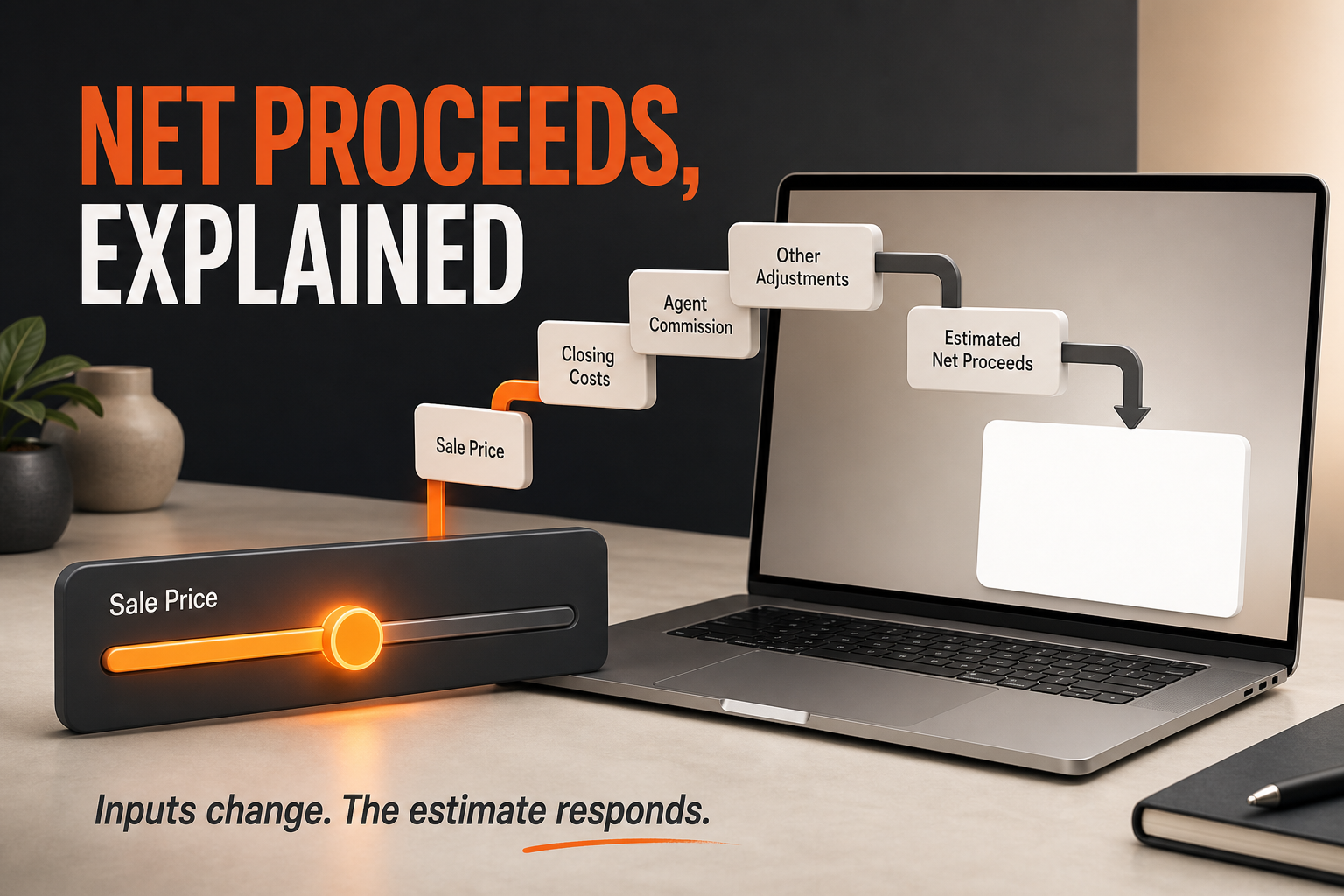
The estimated-proceeds module can be the most useful interactive section because it makes assumptions visible. The included skill supports editable sale price, commission fields, estimated seller closing costs, mortgage or lien payoff, seller concessions, and other expenses. Each deduction flows into an estimated net figure and an accompanying waterfall.
The value is not the animation. The value is transparency. A seller can see which inputs come from current discussion, which require a settlement professional, and which may change. The agent can compare scenarios without handing over a screenshot that looks final.
The National Association of Realtors explains that compensation is negotiable and not set by law. Although that consumer guide focuses on written buyer agreements, the principle matters whenever compensation appears in an estimate: the interface should not present one percentage as universal or mandatory.
The skill therefore requires adjustable fields and explicit disclosures. All amounts are estimates. Compensation is negotiable and is not set by law or an MLS. Historical data does not prescribe a future offer. Taxes, prorations, title charges, payoff figures, and settlement amounts must be confirmed by the appropriate professionals.
The calculator should remain local in the browser unless storage is explicitly requested. It should use tabular numerals so the interface does not jump as values change. At least three test cases should be run before handoff, including a simple base case, a scenario with concessions and payoff, and an edge case that verifies the calculator does not produce impossible output.
Verify Every Claim Before It Becomes Design
Beautiful unsupported claims are still unsupported. The most important quality system in this workflow is the claim ledger. It prevents a design from turning a loose sentence into apparent proof.
Marketing reach is a common risk. If an agent supplies a comparison between typical exposure and documented reach, the page must identify whether the figure is a guarantee, historical average, target, or example. It must name the source and date, include the caveat in the same section, and explain that delivery and response vary by property, market, creative, platform, budget, and campaign.
The visual scale also needs restraint. If one value is dramatically larger, a literal bar can reduce the comparison value to an unreadable sliver. The skill caps the drawn ratio around eight to one while printing the true multiple as text. That keeps the chart understandable without changing the underlying number.
Fair housing review belongs inside this source gate, not at the end as a generic disclaimer. The current HUD overview of fair housing rights and obligations explains the federal framework, identifies advertising among the covered housing-related activities, and lists the protected classes under the Fair Housing Act. Treat that source as a practical guardrail: keep the presentation focused on the property, the seller's stated goals, and verifiable market evidence instead of making promises or audience assumptions tied to protected characteristics.
Property marketing should describe the property, the permitted geography, the creative, the platform-approved settings, the reporting process, and the services actually used. It should not describe preferred buyers or target people based on protected characteristics. AI does not remove that responsibility; it makes written guardrails and review even more important.

Download the Exact Seller Presentation Skill
The file below is the exact 16,724-byte source ZIP used for this walkthrough. It is not a mockup or a rewritten approximation. Its SHA-256 checksum is \1c355f919e518b1f8e59c345c1fcb813d43e9a1b08e6dfe95f6764a1e610a2c1\.
The archive contains the main skill instructions, the setup interview, the intake and claims guide, design directions, motion and layout rules, and three neutral TypeScript data templates. It ships without an agent's logo, colors, address, client information, testimonial, production number, transaction record, or media.
OpenAI describes skills as reusable bundles of instructions and resources that help ChatGPT perform specialized tasks consistently. The current OpenAI skills help article explains how skills work and how they can be shared. The OpenAI Academy guide to using skills provides additional setup context.
The skill is intended to be inspected before use. Read its privacy boundaries, choose a safe profile location, confirm every source, and start with authorized sample material. A downloadable workflow is useful because the rules are visible. It should not be treated as a black box.
How to Use the Skill Safely
Begin in a clean project folder. Install the skill using the current instructions for your ChatGPT or Codex environment, then invoke it without property data. The first run should detect that the local profile is missing and begin the six-step setup interview.
Provide only materials you own or have permission to use. Verify the logo file, brand colors, fonts, review excerpts, credentials, media examples, service descriptions, and source records before they are saved. If a performance statement cannot be supported, omit it.
After the profile is created, start a new run with property-specific inputs. Keep personal information to the minimum necessary. Identify any facts or sections that must remain private. Choose local-only delivery when a shareable page is unnecessary. If a public URL is required, define the access policy and preserve the existing hosting project identity when updating a deployed presentation.
Review the proposed information architecture before implementation. Confirm the design direction and accessible color pairs. Check that the estimate is requested, that its inputs are appropriate, and that every caveat is visible. The agent should approve the final display language, not merely the raw source.
Run one focused quality pass. Verify images, logos, video facades, links, navigation, calculator cases, counters, mobile behavior at 390 pixels, desktop layout, reduced-motion behavior, focus states, contrast, source status, and access policy. Make one targeted repair pass for objective failures, then stop and report anything unresolved.
Why the Human Meeting Still Matters
The page prepares the discussion; it does not make the professional decision. The seller still needs an accountable person to interpret property condition, market evidence, risk, timing, competing priorities, and the tradeoffs behind a recommended strategy.
AI can organize approved material and assemble a coherent experience. It cannot responsibly invent a credential, predict a sale result, decide which fact a seller should withhold, or guarantee how buyers will respond. It should not publish, contact a client, or expose a private page without the user's explicit authority.
The strongest use of the workflow is selective. Let the system handle repeatable structure, responsive implementation, asset bookkeeping, and QA prompts. Keep pricing judgment, advice, negotiation, disclosure, compliance decisions, and final approval with the professional.
This boundary makes the page more persuasive, not less. Sellers can see a prepared system without being asked to believe that software replaced the agent. The technology demonstrates operating discipline, while the appointment remains centered on judgment and the seller's goals.
Measure Whether the Presentation Improves the Process
Do not publish a conversion claim because one seller reacted positively. Establish a baseline first. Track how long it takes to prepare the page, how much time human review requires, how many factual corrections are needed, how often an asset is missing, whether the page is opened before the appointment, and which sections receive meaningful engagement.
The first useful metric is correction count. If the workflow repeatedly produces pages that require fewer factual repairs while preserving review quality, the system is becoming more dependable. Preparation time is helpful only when it includes the time spent verifying inputs and fixing the output.
The next metric is conversation quality. Ask whether the seller arrived with more specific questions, whether the meeting spent less time on generic background, and whether assumptions were easier to explain. Those observations can be recorded without claiming that the website caused a particular client decision.
Finally, review the profile itself. Claims expire. Services change. Channels are added or removed. A design direction can drift away from the brand. Schedule a periodic profile review so reusable information does not become permanently trusted information.
Common Failure Modes
The page becomes a generic template. This happens when the workflow receives too little property context. Do not compensate with filler. Pause, request the missing inputs, or clearly label a draft as incomplete.
The profile absorbs private property data. Durable brand information and one property's facts belong in separate stores. If a property field enters the profile, remove it and verify that later runs cannot inherit it.
The estimate looks final. Strengthen the label, move caveats beside the result, keep fields editable, and review the language with the appropriate broker or compliance owner.
Proof has no source. Remove the claim until the ledger has exact wording, source, date, conditions, caveat, and approval status. A screenshot of a claim is not evidence for itself.
Motion obscures the content. Simplify it, honor reduced-motion preferences, and keep movement away from controls. The seller should understand the story even when animation is disabled.
The page works only on a laptop. Test a 390-pixel viewport, touch navigation, image loading, horizontal overflow, and every interactive control before sharing.
The agent sends it too late. Delivery timing should be part of the operating procedure. Send the approved page early enough for the seller to review it, while keeping the information current and the access policy appropriate.
A Practical Rollout Plan
For the first use, choose a controlled example with authorized materials and no sensitive client information. Complete the profile, build the page, and compare it against the manual presentation standard. The goal is not to impress the model; it is to discover which inputs, claims, and review steps the system actually needs.
For the second use, do not rebuild the profile. Confirm that the workflow recognizes it, summarizes who it belongs to and when it was updated, and asks only for the new property intake. That is the critical reuse test.
For the third use, test an exception: missing video, a section that must stay private, a different order, or a local-only access policy. A durable system must handle absent material by collapsing the section, not by inventing a substitute.
After three reviewed runs, decide whether the process deserves regular use. Update the profile where the evidence supports a change. Preserve the claim ledger. Document the delivery timing. Keep the final approval gate with the agent.
The opportunity is not a magic presentation. It is a repeatable preparation system that makes high standards visible before the meeting begins.
Follow AgentAIBrief on Instagram for practical AI operating workflows, or subscribe to AgentAIBrief for implementation guides built for real estate professionals.
Frequently Asked Questions
What does the seller presentation skill create?
It creates a mobile-first guided website using the agent's approved profile and a separate property intake. The page can include positioning, process, marketing channels, media, proof, an optional estimated-proceeds tool, and a next step.
Does the download include another agent's branding or data?
No. The package is intentionally neutral. It does not ship with a logo, colors, client information, property details, reviews, media, credentials, or production claims. The installing agent supplies authorized material during setup.
Does the estimate promise what the seller will receive?
No. Every amount is an estimate, inputs remain editable, compensation is negotiable, and settlement-related figures require confirmation from the appropriate professionals.
Can the skill publish a page automatically?
Publication should remain an explicit permission boundary. The skill can prepare and test a deployable project, but the user must request public delivery and approve the access policy.
Why store the profile outside the skill folder?
The separation prevents workflow upgrades from overwriting the agent's identity and keeps reusable brand data apart from property-specific information.
How should the finished page be verified?
Run one focused pass covering media, links, navigation, calculator cases, motion, reduced-motion behavior, mobile and desktop layout, contrast, source status, and access policy. Make one targeted repair pass for objective failures.