The AI Office Exclusive Workflow That Makes Buyers Feel Like You Are Actually Hunting For Them
The most painful buyer-agent failure is not usually a bad showing.
It is the slow, quiet feeling that the client is doing the search alone.
You know the sentence:
I never felt like my agent was finding me properties. I was always sending them the homes I wanted to see.
That is a brutal thing for a buyer client to say because it means the agent lost the most important part of the relationship: the sense that someone is actively working on their behalf.
The fix is not another generic drip campaign.
The fix is a daily system that checks inventory the client cannot easily monitor themselves, compares it against real CRM behavior, and drafts a useful message for the agent before the client has to ask.
That is where a Mac mini running an agent like OpenClaw or Hermes Agent becomes more than a nerd toy. It becomes a buyer-service layer.
The workflow is simple:
- Monitor office-exclusive and early-access inventory.
- Pull buyer intent from CRM alerts, saved searches, property views, and high-intent lead pools.
- Match listings to buyers using price, location, property type, bedrooms, bathrooms, timing, and engagement signals.
- Draft a short message for agent review.
- Send nothing until a human approves it.
That last part matters. The AI should find the opportunity. The agent should own the relationship.
Player not loading? Watch this video directly on YouTube.
Why this matters now
The private listing and office-exclusive conversation is not going away.
RealScout has an entire Exclusives product area for brokerages and teams that want to input, manage, search, and share exclusive listings. RealScout's own help center says the Exclusives section displays off-market and exclusive listings shared within your network and supports saved searches using standard listing-alert filters.
Zillow has also been tightening and revising its Listing Access Standards, while Redfin announced a Compass partnership to expand certain coming-soon and exclusive inventory visible on Redfin.
The practical takeaway for an agent is not "hide listings."
The practical takeaway is this:
Inventory is fragmenting across public portals, brokerage networks, office exclusives, coming-soon pages, and CRM alerts. If your buyer clients only see what appears in a normal public search, they may not be seeing everything you can legally and ethically help them evaluate.
For a large team, that creates an operations problem.
You may have thousands of buyers in the database, hundreds of saved searches, dozens of active buyer-alert segments, and a constant stream of new inventory across RealScout, brokerage exclusives, Zillow Preview or coming-soon searches, Redfin early-access inventory, and the MLS.
No human is going to manually compare all of that every morning with enough consistency.
An agent can do it once.
A team can do it for a week.
A Mac mini agent can do it every day.
The real workflow from the field
Here is the version we ran.
The inventory source was RealScout company exclusives. In this account, the dashboard showed 139 company exclusives and 49 listings published in the past month.
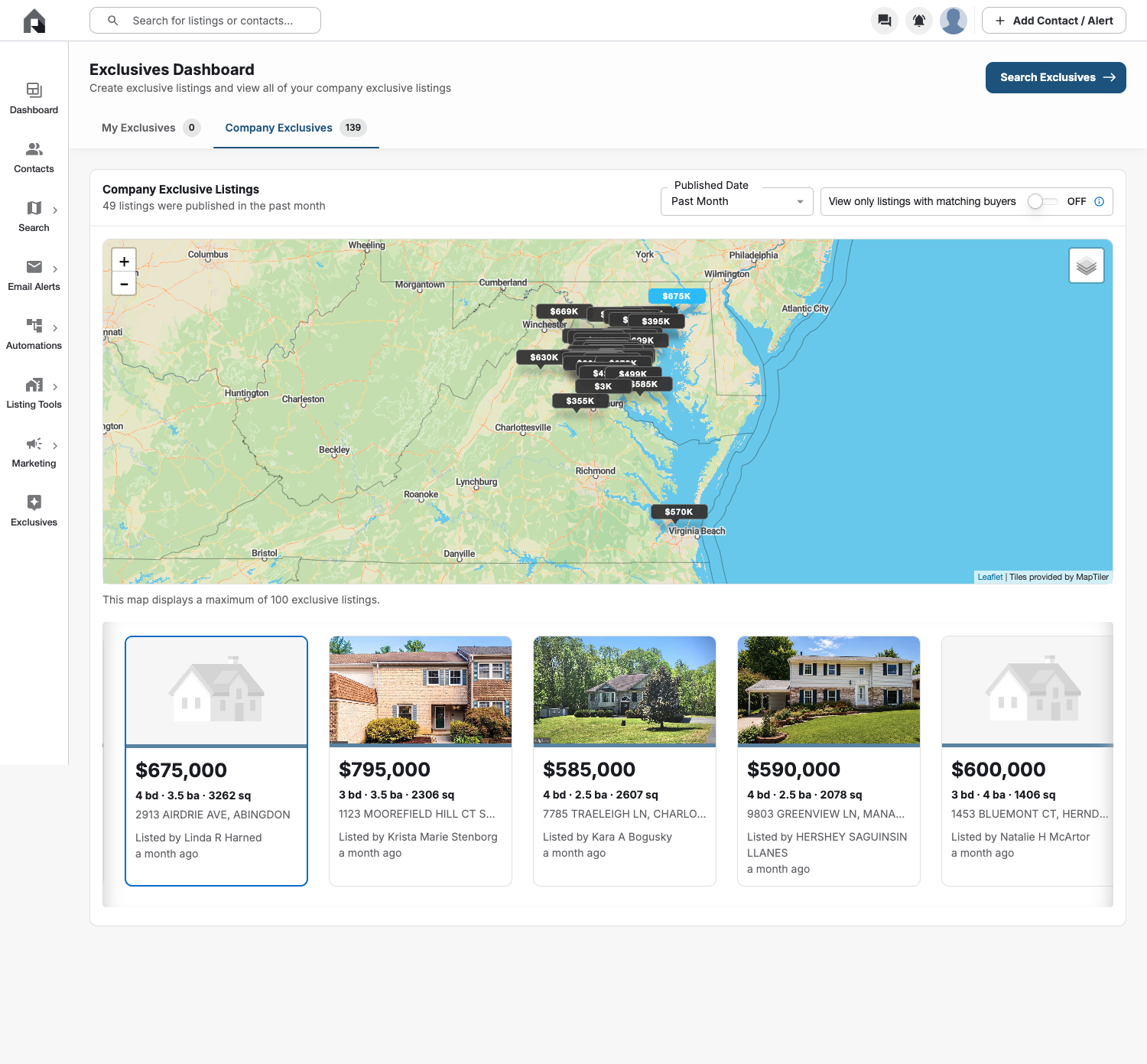
That is the first piece of the system: do not make the CRM search first. Make the inventory search first.
Why?
Because the inventory is the scarce asset.
If a buyer can find the home on Zillow, Redfin, Homes.com, Realtor.com, their MLS portal, your IDX site, and five automated alert emails, your message is probably not special.
But if the property is an office exclusive, brokerage exclusive, early-access listing, coming-soon listing, or another source the buyer is unlikely to catch alone, the message has actual value.
The agent is no longer saying:
Here is a home you already saw online.
The agent is saying:
I found something that may fit what you have been looking for, and it may not be obvious in a normal public search yet.
That is a different relationship.
Step 1: Build the inventory monitor
The first agent job is inventory capture.
On a Mac mini, OpenClaw or Hermes can run a scheduled browser workflow that checks your approved sources:
- RealScout company exclusives
- Brokerage office-exclusive pages
- Internal brokerage systems
- Zillow Preview or coming-soon searches
- Redfin early-access or coming-soon inventory
- MLS coming-soon views, if permitted by your MLS and brokerage rules
For my setup, RealScout is the primary source because it is built for exclusive listings and buyer matching. RealScout's documentation says agents can navigate to Exclusives from the dashboard, and managers can access it under Manager Tools when creating exclusive listings.
The agent captures the practical matching fields:
- Address or listing identifier
- Price
- City or area
- Beds, baths, and square footage
- Property type
- Listing agent
- Published date
- Source platform
- Whether the listing is available for one-to-one client sharing
The important part is not just scraping a page. The important part is turning inventory into a structured list the CRM can compare against.
Step 2: Pull the buyer intent from the CRM
The second agent job is not "find every lead."
That is too broad.
The job is to find buyer clients and leads with clear evidence that a property recommendation would be useful.
In Sierra, the useful pools include things like:
- Single Property View 5x or more
- BUY ASAP
- ACTIVE 1 and ACTIVE 2
- BUY - 90 DAYS
- LPMAMA
- Hot Buyers
- Listing curiosity
- Saved searches and E-Alerts
In the run shown below, the proof package checked multiple Sierra high-intent pools and pulled matchable subsets for review. The screenshot is cropped before the lead-name section because the public blog does not need client data.
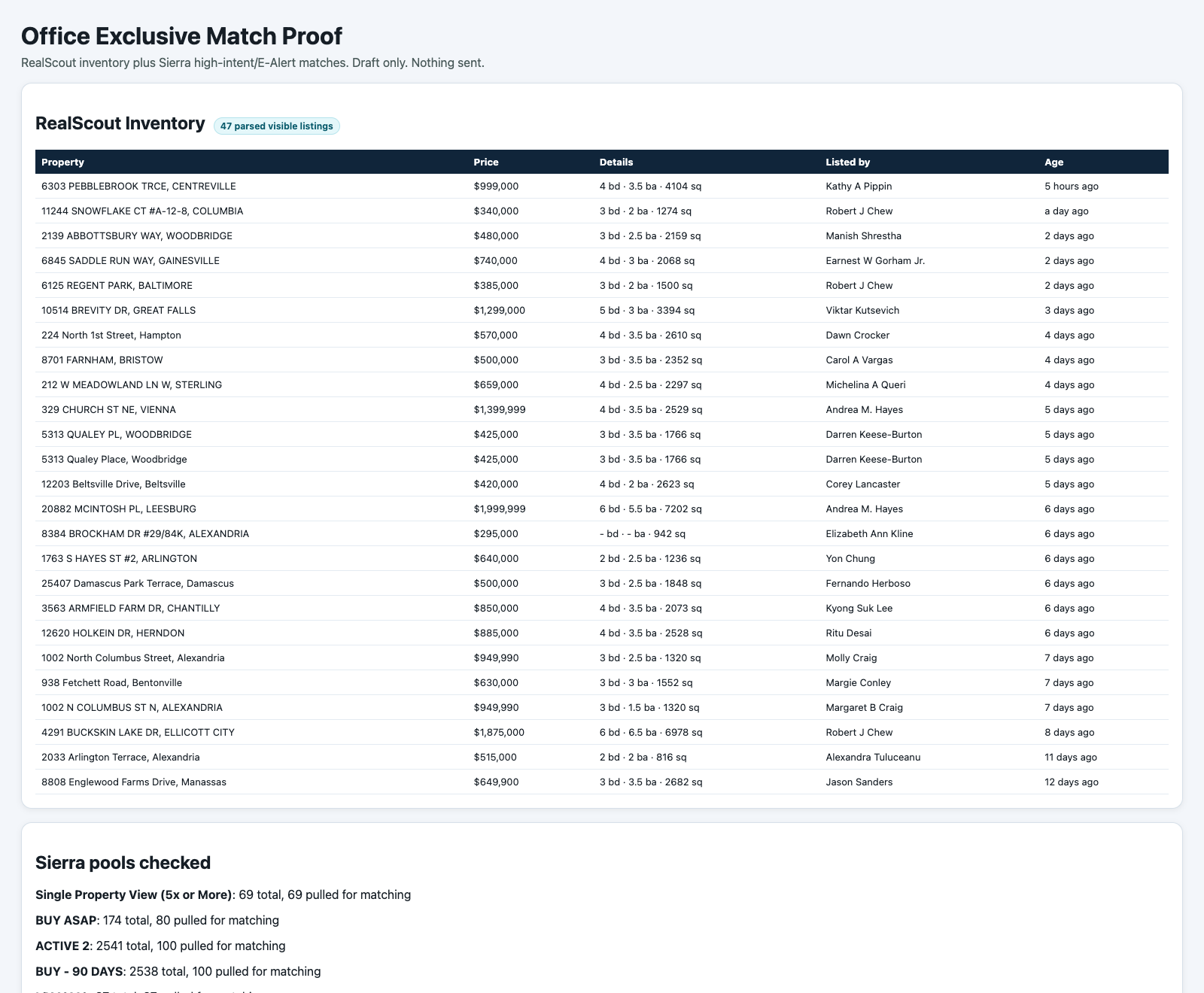
This is where the system starts to matter.
A normal agent workflow says:
Wait for the buyer to email me a listing.
An AI-assisted operator workflow says:
Which buyers have already told us, through their alerts and behavior, that this property might matter?
That can include explicit data:
- Saved-search location
- Price range
- Property type
- Bedrooms and bathrooms
- School or commute filters, where compliant and appropriate
- E-Alert subscriptions
It can also include behavioral data:
- Recent visits
- Repeat property views
- Saved listings
- Viewed properties similar to the exclusive
- High-intent lead status
- Time since last agent contact
The system should never treat one signal as enough.
One page view is weak.
One page view plus an active E-Alert plus repeat visits plus a price/location match is much stronger.
Step 3: Match on criteria, not vibes
This is where most agent automations get sloppy.
They say "AI matched this buyer to this house" but the logic is basically a keyword overlap.
That is not good enough.
For this workflow, the matching rules should be boring and strict:
- Price should fit the buyer's observed range or be close enough to justify review.
- Location should match the buyer's search geography or nearby patterns.
- Property type should match what the buyer has actually viewed.
- Beds and baths should be reasonably aligned.
- The buyer should show current or recent activity.
- The listing should be new enough that the agent can bring something fresh.
- The source should be something the agent can share under brokerage, MLS, and platform rules.
The AI can rank the matches, but it should show its work.
For every draft recommendation, the agent should see:
- The listing source
- The property summary
- Why the buyer is a candidate
- Which CRM signals were used
- Whether the listing is public, coming soon, office exclusive, or brokerage exclusive
- Whether the message is draft-only or approved
That keeps the system from becoming a spam machine.
Step 4: Draft the message, but do not auto-send it
This is the line I would not cross.
The AI can draft.
The agent approves.
Especially with office exclusives, you need brokerage compliance, MLS compliance, seller instructions, and client context. A good automation should produce a short draft that the agent can edit, not blast a lead list.
A safe draft looks like this:
I saw an early-access listing that may match the type of homes you have been looking at. It is in [area], listed around [price], with [basic property details]. Want me to send you the details?
That message works because it is specific, useful, and low pressure.
It does not pretend the client asked for it.
It does not overstate access.
It does not say the home is perfect for anyone.
It gives the client a reason to respond.
Why a Mac mini is the right shape for this
You do not need a massive enterprise AI platform to start.
A Mac mini is a useful home base because it can stay on, stay logged into the browser profiles you control, and run scheduled checks without tying up your laptop.
OpenClaw is useful when you want the agent reachable through chat and capable of using browsers, files, schedules, and local tools. Hermes Agent is interesting because it is built around a learning-loop idea: it can create skills from prior work and improve recurring workflows over time.
For this use case, the hardware is not the magic.
The habit is the magic.
Every morning, the agent should answer the same operational questions:
- What new office-exclusive or early-access inventory appeared?
- Which buyer-alert pools have matching demand?
- Which matches are strong enough for human review?
- Which messages should be drafted?
- Which source screenshots prove the match?
- Was anything sent? If yes, who approved it?
That is how you turn AI from a chatbot into an operations employee.
The compliance boundary
This workflow has to be built carefully.
Private inventory is sensitive. Seller instructions matter. MLS rules matter. Platform rules matter. Brokerage policy matters.
Zillow's public guidance around listing access focuses on broad market access and transparency. RealScout's exclusives documentation is designed for controlled exclusive-listing workflows. Redfin's partnership announcements show how private and coming-soon inventory is being handled differently by different companies.
So the rule is simple:
The AI can monitor, summarize, match, and draft. It should not publish, advertise, message, or promise access without human approval.
A good workflow should log:
- Source platform
- Date captured
- Listing status
- Matching criteria
- Draft message
- Reviewing agent
- Approval status
- Whether anything was actually sent
If the listing cannot be shared one-to-one under the relevant rules, the system should mark it as "do not contact" and move on.
What this changes for a team
For a solo agent, this saves time.
For a large team, it fixes a real service gap.
On a team, the buyer database is usually bigger than any one agent can manually watch. There may be tens of thousands of contacts, thousands of alerts, and dozens of agents with different follow-up habits.
That means good matches get missed.
The AI workflow creates a second set of eyes.
It does not replace the agent. It makes the agent look more prepared.
Instead of waiting for the client to send a Zillow link, the agent can say:
I saw something this morning that lines up with what you have been looking at. It may not be something you would catch in a normal search. Want me to send it over?
That is how you rebuild the feeling that the agent is actually hunting.
The build sheet
If I were setting this up from scratch, I would build it in this order:
1. Inventory sources
Start with one reliable source.
For many teams, that is RealScout Exclusives. Then add approved brokerage pages, Zillow coming-soon or Preview monitoring, Redfin early-access views, and MLS coming-soon views where allowed.
Do not add every source on day one. Get one source working and proven.
2. CRM matching pools
Start with the highest-intent groups:
- Buyers with active E-Alerts
- Buyers with repeat property views
- Buyers in "buy soon" segments
- Buyers with saved homes
- Buyers who viewed the same property multiple times
- Buyers who have been active recently
Do not blast the whole database.
3. Match scoring
Use a visible scorecard:
- Price match
- Location match
- Property type match
- Bedroom and bathroom fit
- Recency of buyer activity
- Strength of buyer intent
- Freshness of the listing
- Shareability under the source rules
If the agent cannot explain why the match was recommended, the match should not be sent.
4. Proof screenshots
Save proof every time.
The proof package should include:
- Source inventory screenshot
- CRM pool summary
- Match criteria
- Draft text
- No-outreach or outreach-approved status
This is not just for compliance. It is how the workflow gets better.
When an agent says "that match was bad," you can inspect the criteria and improve the scoring.
5. Human approval
The final button should belong to a person.
AI should never be the one deciding to text a buyer about an office-exclusive listing. The agent knows the client history, the relationship, the active search context, and the local compliance boundaries.
The system should make the agent faster, not reckless.
The bigger lesson
Most real estate AI content is still stuck at "write me a caption" or "make a listing description."
That is fine, but it is not the big opportunity.
The big opportunity is operational AI.
Use it to watch the things humans forget to watch.
Use it to compare data humans do not have time to compare.
Use it to surface the one or two useful actions an agent should take today.
For buyer service, office-exclusive matching is one of the cleanest examples.
It solves a real pain:
My agent was not finding me anything.
And it replaces that pain with a better client experience:
My agent found something I could not easily find on my own.
That is the kind of AI workflow agents will actually pay for because it does not just save time. It creates a moment of value the client can feel.
Want more real estate AI workflows like this? Subscribe to AgentAIBrief, follow @AgentAIBrief on Instagram for daily AI tips and workflows, and read the related local AEO audit playbook for another screenshot-driven example of how we turn AI into a practical real estate operating system.