Codex Record & Replay: Browser Work Is Becoming Agent Work
Player not loading? Watch this video directly on YouTube.
Most real estate AI advice is still stuck at the prompt level.
Write a listing description. Draft an email. Make a caption.
Useful, sure.
But the bigger opportunity is much larger:
If you can do a repeatable process in a browser, you can now start turning that process into agent work.
That does not mean every workflow should run without human judgment.
It means the steps can be recorded, saved, replayed, checked, and brought back to you for approval.
That is why OpenAI's new Codex Record & Replay feature matters for real estate agents.
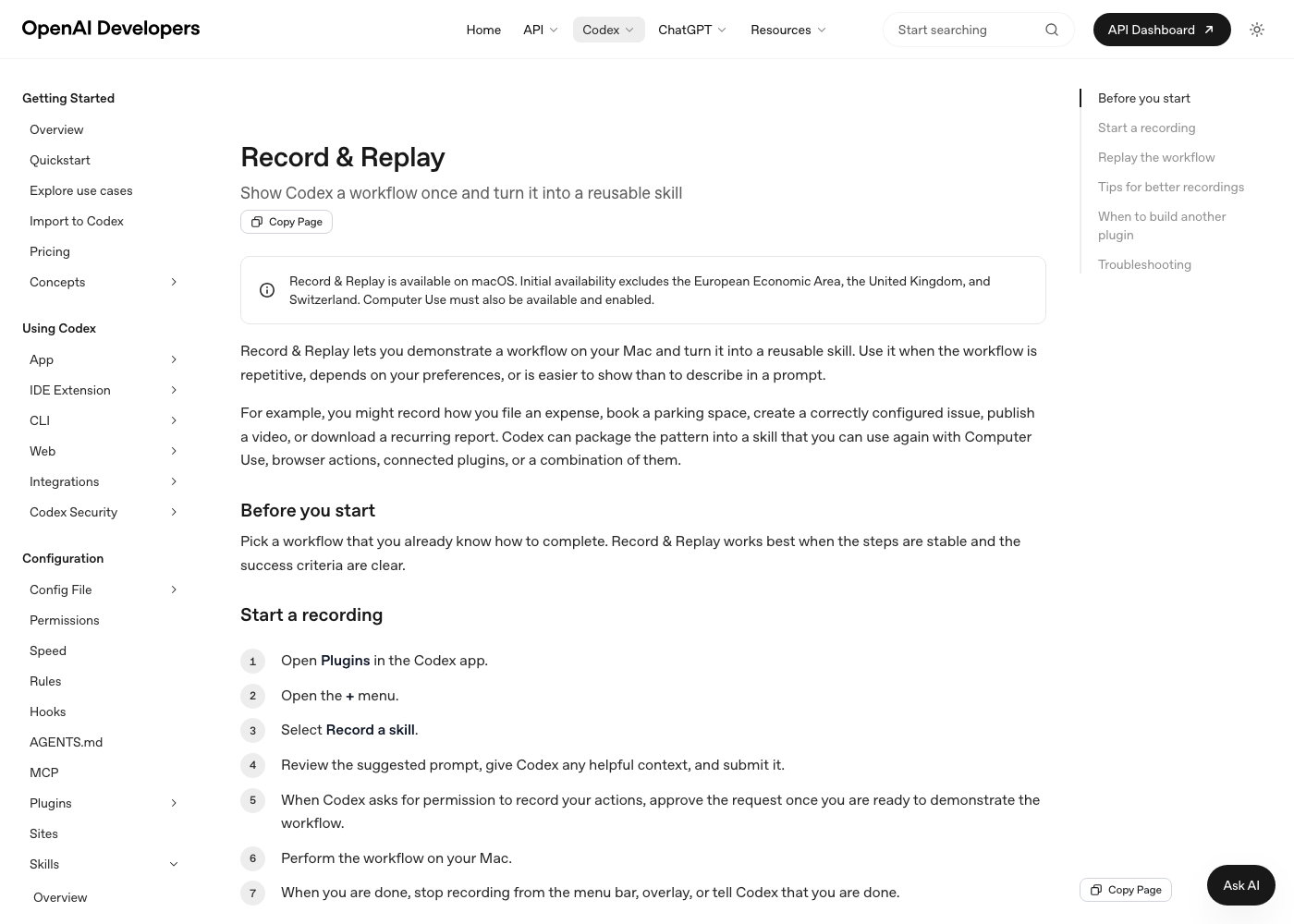
OpenAI describes Record & Replay as a way to show Codex a workflow once and turn it into a reusable skill. The official docs say it is available on macOS where Computer Use is available and enabled, and that it is built for workflows that are repetitive, preference-heavy, or easier to demonstrate than explain.
That is basically the real estate business.
Real estate is not one task. It is a stack of browser workflows:
- Log into the CRM.
- Check lead activity.
- Pull a listing.
- Build an ad.
- Draft a contract.
- Update a Google Business Profile.
- Publish a blog.
- Schedule an email.
- Verify a form.
- Check whether the public page actually loaded.
For years, agents had to either do those steps manually or hire someone and train them one workflow at a time.
Now the training itself can become reusable.
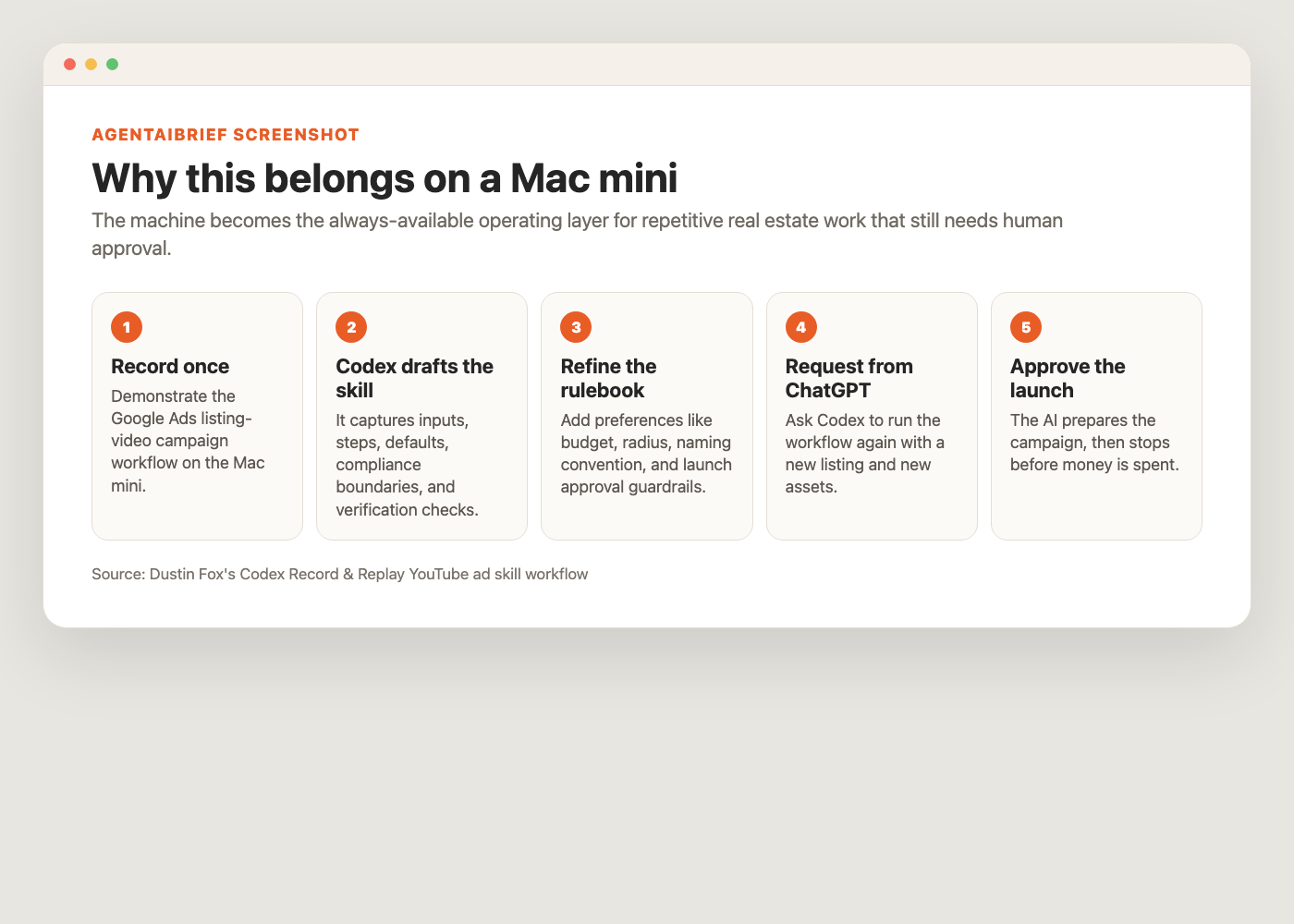
I just used Record & Replay on my Mac mini for one Fox Homes Team workflow: creating local YouTube ad campaigns for new listings.
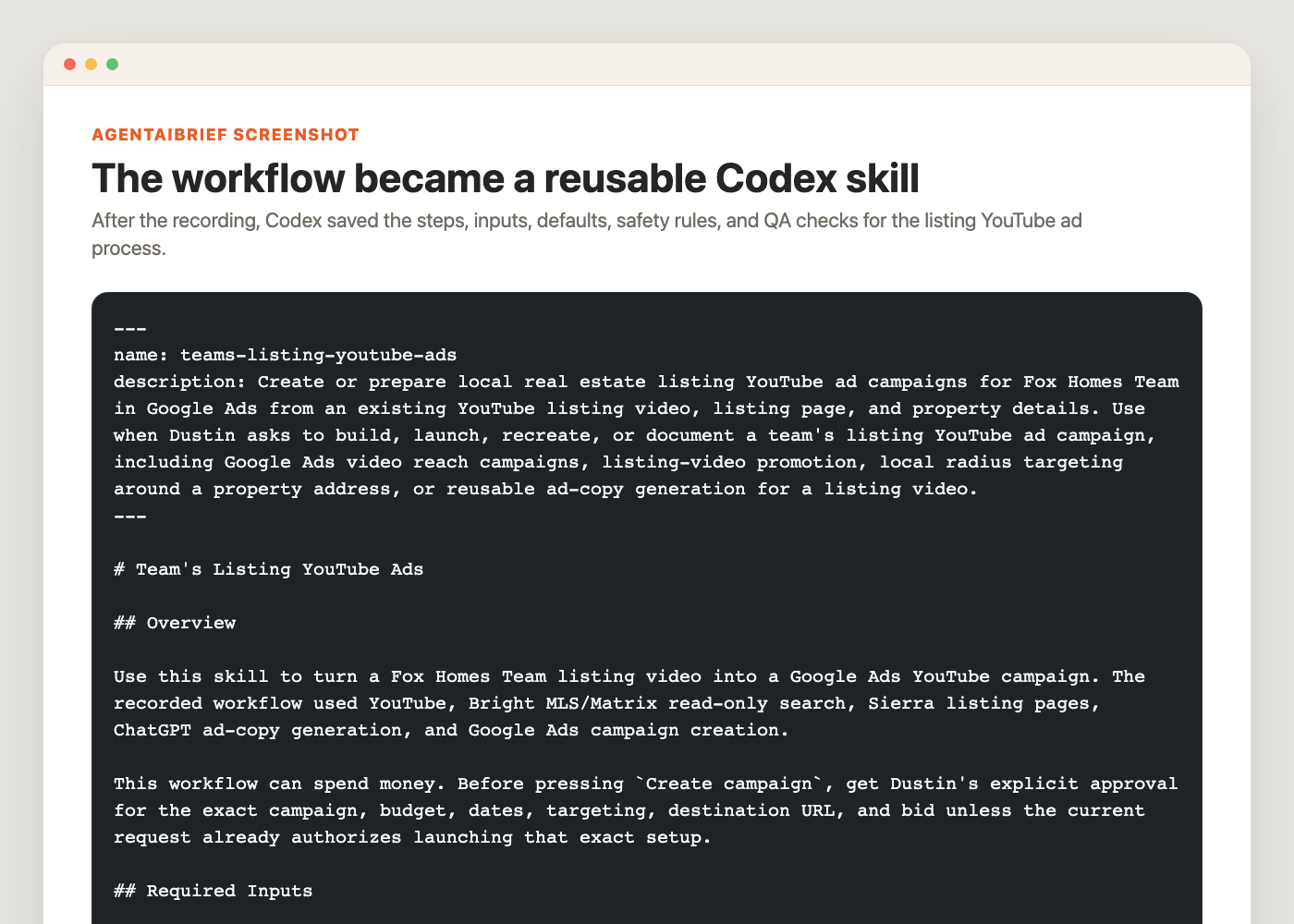
The result was not just a note. Codex created a reusable skill that remembers the steps, the required inputs, the defaults, the compliance boundaries, and the final QA before launch.
Now, instead of explaining the full process every time, I can go into the Codex section of the ChatGPT app and request the same workflow for the next listing.
The YouTube ad skill is the example.
The bigger lesson is that the browser is becoming programmable through demonstration.
That is what "autonomous" should mean for agents right now: not reckless button-clicking, but a trained workflow that can move through the browser, do the repetitive work, document what happened, and stop at the decision point.
The bigger shift: anything repeatable in the browser can become a skill
Real estate teams do not lose time only because tasks are hard.
They lose time because tasks are repetitive and full of tiny preferences.
That is the important distinction.
AI writing a paragraph is nice.
AI learning a business process is different.
Think about how much real estate work happens in a browser:
- Google Ads
- Google Business Profile
- Sierra, Follow Up Boss, RealScout, Lofty, BoomTown, or another CRM
- Dotloop, SkySlope, DocuSign, or transaction platforms
- MLS research screens
- WordPress, Sierra, Webflow, or another website editor
- Constant Contact, Mailchimp, or email marketing software
- YouTube Studio
- Canva
- Google Drive, Docs, Sheets, and Slides
- Review platforms
- Local SEO tools
Most of that work has a pattern.
Open a system. Find the right record. Pull context. Fill fields. Check warnings. Save. Reopen. Verify.
That is exactly the kind of work that can be recorded once and replayed with new inputs.
The YouTube ad workflow makes this easy to see.
A listing YouTube ad is not just "make an ad."
The actual workflow has a lot of little steps:
- Find the correct YouTube listing video.
- Confirm the video title matches the property.
- Find or build the right Sierra listing page URL.
- Pull listing copy or property details.
- Generate compliant Google Ads headlines and descriptions.
- Create a YouTube reach campaign in Google Ads.
- Set the budget correctly.
- Set the dates correctly.
- Target a radius around the listing address.
- Avoid stale default locations.
- Use the correct final URL.
- Keep the ad copy feature-focused and Fair Housing safe.
- Stop before spending money until a human approves the final launch.
That is the kind of workflow where a normal prompt falls apart.
You can tell ChatGPT what you want, but it does not know the exact buttons, preferences, default settings, naming conventions, or guardrails unless you explain them again.
Record & Replay changes the interaction.
You demonstrate the workflow once. Codex watches the process, then turns the pattern into a skill that can be reused.
Why I have this on my Mac mini
I keep this type of workflow on a Mac mini because it is the machine I can treat like an always-available operations layer.
My laptop is where I work.
The Mac mini is where repeatable business processes can live.
That distinction matters.
If an AI workflow depends on browser sessions, local files, screenshots, desktop apps, or authenticated tools, I do not want it tied to whether I happen to have my laptop open. I want a stable machine that can hold the environment, keep the tools installed, and become the place where repetitive workflows are recorded, refined, and replayed.
For real estate teams, the Mac mini is not magic by itself.
The magic is that it becomes the boring, dependable machine where agents can store workflows like:
- Listing YouTube ad setup
- Office-exclusive inventory monitoring
- Buyer-alert matching
- CRM cleanup
- Contract and addendum draft prep from approved templates
- Blog publishing checks
- Constant Contact campaign prep
- Google Business Profile content workflows
- Listing description generation
- Market update production
- Screenshot-driven QA
That is the real shift.
AI is not only answering questions anymore. It is learning how work gets done across the tools agents already use.
The rule: browser plus pattern plus approval
The way I think about this is simple.
If a workflow has these three things, it is a candidate for Record & Replay:
- It happens in a browser or Mac app.
- It follows a repeatable pattern.
- It has a clear approval or verification point.
That applies to way more than ads.
It could prepare a contract package by opening your transaction platform, pulling the approved template, filling known property details, flagging missing fields, and stopping before anything is sent or signed.
It could update a Google Business Profile by drafting the post, choosing the right photo, adding the link, checking the preview, and stopping before publication if you want approval.
It could publish a blog by loading the CMS, inserting the article, adding screenshots, checking internal links, saving the post, and verifying the public URL.
It could review CRM activity by opening buyer alerts, finding leads with fresh activity, matching them to new listings, drafting suggested outreach, and stopping before sending a text or email.
It could run a weekly listing-marketing QA pass by checking YouTube links, ad URLs, landing pages, lead forms, and email buttons.
The point is not that Codex should make judgment calls for you.
The point is that judgment should not be wasted on remembering which menu to click.
What Codex saved from my YouTube ad workflow
After the recording, Codex created a skill called teams-listing-youtube-ads.
The skill knows when to use the workflow: when I ask to build, launch, recreate, or document a listing YouTube ad campaign for Fox Homes Team.
It also captured the required inputs:
- YouTube listing video URL
- Property address
- Listing agent or campaign owner name
- Sierra or property-search destination URL
- Listing description or key property features
- Listing live date
- Budget and bid
It saved the demonstrated defaults too:
$200campaign total budget as a draft value5 miradius targeting around the property address$10target CPM as a draft value- End date set to the Sunday after the listing live date
More importantly, it saved the guardrails.
The skill says not to click Create campaign unless I have explicitly approved the exact campaign, budget, dates, targeting, URL, and bid.
That is the difference between an AI workflow and an AI liability.
You do not want an agent spending money just because it can click buttons. You want it to prepare the work, verify the setup, and stop at the point where human judgment matters.
Step-by-step: how to record your own real estate workflow
Here is the simple version if you want to try this yourself.
1. Pick one workflow that is stable
Do not start with your messiest process.
Pick something you already know how to do and can demonstrate cleanly from beginning to end.
Good first candidates:
- Create a listing ad campaign
- Download a recurring report
- Build a listing description from approved property details
- Run a blog QA checklist
- Export a CRM lead segment
- Prepare a seller market update
The workflow should have clear success criteria.
For my YouTube ad skill, success means the campaign is prepared with the correct video, destination URL, budget, dates, radius targeting, bid, and copy. It also means Codex stops before launch until I approve the spend.
2. Open Codex in the ChatGPT app
Open the ChatGPT app and go to Codex.
This is where the workflow gets recorded and where you will later request the replay.
You are not trying to write the perfect prompt yet.
You are giving Codex enough context to understand what it is about to watch.
3. Start Record & Replay
Open Plugins in Codex, use the plus menu, and choose the option to record a skill.
The OpenAI docs describe the flow as:
- Open Plugins in the Codex app.
- Open the plus menu.
- Select Record a skill.
- Review the suggested prompt and add helpful context.
- Approve the recording request when you are ready.
- Perform the workflow on your Mac.
- Stop recording when the workflow is complete.
That last step matters.
Do not keep recording random cleanup. Keep the session focused on the one workflow you want Codex to learn.
4. Tell Codex what varies each time
Before you demonstrate, give Codex the variables.
For a listing YouTube ad, the variables are:
- Property address
- Listing video
- Listing page URL
- Listing agent name
- Live date
- Budget
- Bid
- Radius
- Campaign start and end dates
For a blog workflow, the variables might be:
- Topic
- Target keyword
- Source links
- Screenshots
- CTA
- Email campaign destination
This is where most people mess up.
They record the clicks, but they do not explain which pieces change next time. A good skill separates the repeatable process from the changing inputs.
5. Demonstrate the workflow normally
Now do the actual work.
In my case, that meant moving through the listing YouTube ad process:
- Locate the YouTube listing video.
- Confirm the right property.
- Gather listing context.
- Generate compliant ad copy.
- Start the Google Ads video campaign draft.
- Choose the right campaign type.
- Set campaign total budget.
- Set the campaign dates.
- Remove wrong default locations.
- Add radius targeting around the property.
- Paste the YouTube video.
- Add the final URL and ad copy.
- Set the target CPM.
- Review the final setup.
I did not need Codex to launch the campaign during the recording.
The point was to teach it the workflow and the stopping point.
6. Stop recording and let Codex draft the skill
When the workflow is done, stop the recording from the menu bar, overlay, or by telling Codex you are done.
Codex then inspects the captured workflow and drafts the skill.
A good skill should include:
- When to use it
- What inputs are required
- Step-by-step workflow
- Safety rules
- QA checklist
- Completion summary format
- Places where human approval is required
This is where you should be picky.
If Codex misses a preference, add it.
If it overlooks a risk, write the guardrail directly into the skill.
In my listing ad workflow, the biggest guardrail is simple: prepare the campaign, but stop before spending money.
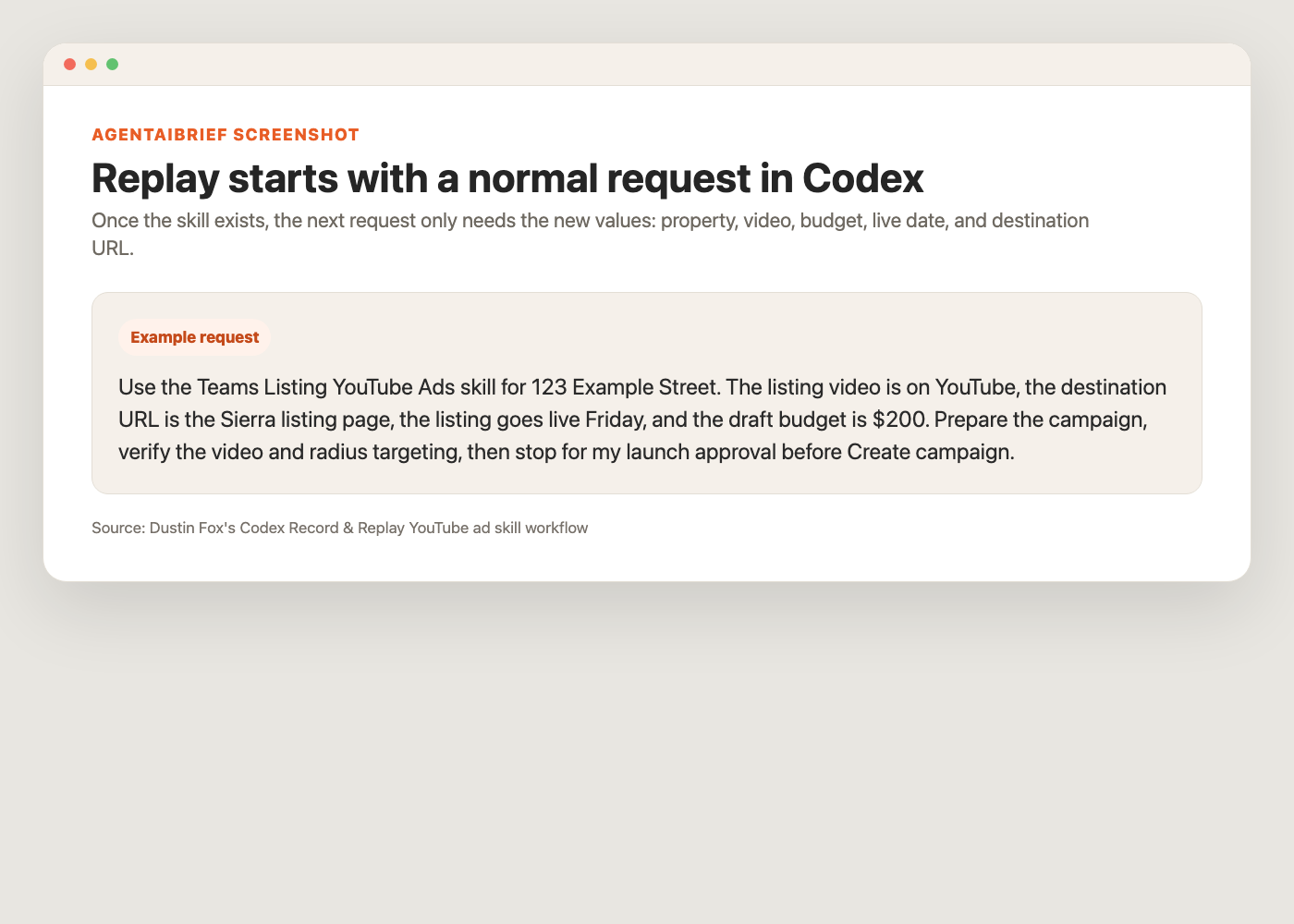
7. Replay it with a new request
Once the skill exists, you do not need to explain the whole workflow again.
You start a new Codex thread and give it the new inputs.
For example:
That is the entire point.
The first time, you teach.
The next time, you request.
The best real estate workflows to record first
If I were building this out for a real estate team, I would not start with broad "run my business" workflows.
I would record narrow, repeatable browser workflows where the value is obvious.
Listing marketing
Record how you turn a new listing into:
- A YouTube ad draft
- Social post copy
- Email campaign copy
- Listing description variants
- A landing page draft
- A seller update report
The goal is not to remove the agent. The goal is to remove the repetitive setup so the agent can review and approve faster.
Contracts and transaction prep
This is a huge category, but it needs strict boundaries.
Record the workflow for preparing draft paperwork from approved templates, not for making legal decisions.
Examples:
- Start a buyer agreement packet from approved brokerage templates
- Draft a listing agreement packet with known property details
- Prepare an addendum from provided terms
- Check that required fields are filled
- Compare the draft against a checklist before human review
The skill should stop before sending anything for signature.
For contracts, the right model is draft, flag, verify, and wait for review.
Google Business Profile and local SEO
Google Business Profile work is browser-heavy and repetitive.
A recorded workflow could:
- Open the correct business profile
- Draft a weekly GBP post from a new blog or listing
- Add the correct image
- Choose the right CTA
- Add the destination URL
- Preview the post
- Save a draft or stop before publish
The same idea works for local SEO checks:
- Search the target query
- Capture the local pack
- Check whether the business appears
- Note competitor language
- Save screenshots
- Create the next content task
That is not glamorous work, but it is the work that compounds.
CRM follow-up
Record how you identify leads that need attention:
- Buyers with repeated property views
- Sellers who requested a valuation
- Old leads with recent activity
- Saved-search matches
- Missed follow-up opportunities
Keep the sending step human-controlled. Let AI surface the opportunity and draft the message.
Content and SEO
Record how you publish or update content:
- Add a YouTube video to a matching blog
- Build a Constant Contact email from a new article
- Check that a blog has the right CTA
- Verify screenshots and links
- Turn a video transcript into a real estate AI blog
- Update internal links across related articles
- Check whether images load publicly
- Create social posts from the published article
This is where the time savings compound because content workflows are full of repeatable structure.
Reporting and management
Team leaders can record reporting workflows too:
- Pull weekly ad spend
- Check lead volume by source
- Review website form submissions
- Export CRM activity reports
- Build a recruiting or seller-opportunity dashboard
- Compare campaign performance against last week
That is where a Mac mini becomes useful in a very practical way.
It can sit there and do the same boring checks every week, then bring you the result.
Operations QA
Record the checks you already do:
- Verify a campaign link
- Confirm a blog image loads
- Check that a form submission goes to the right place
- Review ad copy for compliance language
- Confirm an automation saved correctly
QA is perfect for this because the steps are boring, but missing them is expensive.
What agents should not automate blindly
Record & Replay is powerful, but it should not become a permission slip to let AI act without judgment.
For real estate agents, I would keep these human-approved:
- Spending money on ads
- Sending texts or emails to leads
- Changing live listing data
- Publishing public claims
- Any workflow involving client-specific advice
- Anything that could create a compliance issue
The right model is:
AI prepares. AI verifies. The agent approves.
That is how you get leverage without handing the steering wheel to the software.
The bigger idea
The agents who win with AI will not be the ones who collect the most prompts.
They will be the ones who turn their best workflows into reusable operating systems.
Codex Record & Replay is a big step in that direction because it lets you show the work instead of trying to describe every detail from memory.
For my Mac mini setup, this is exactly why the machine exists.
It is not just there to run random AI tasks.
It is there to become a library of real estate workflows:
- Record the process once.
- Save the skill.
- Replay it with new inputs.
- Require approval where money, compliance, or client communication is involved.
- Improve the skill every time the workflow gets sharper.
That is practical AI.
Not a chatbot trick.
An operating layer for the parts of the real estate business that are too important to forget and too repetitive to keep doing from scratch.
Want more real estate AI workflows like this? Subscribe to AgentAIBrief and follow @AgentAIBrief on Instagram for daily AI tips and workflows.